
Motion graphics · Code
AI motion graphics with code: how creators make animated explainers in 2026
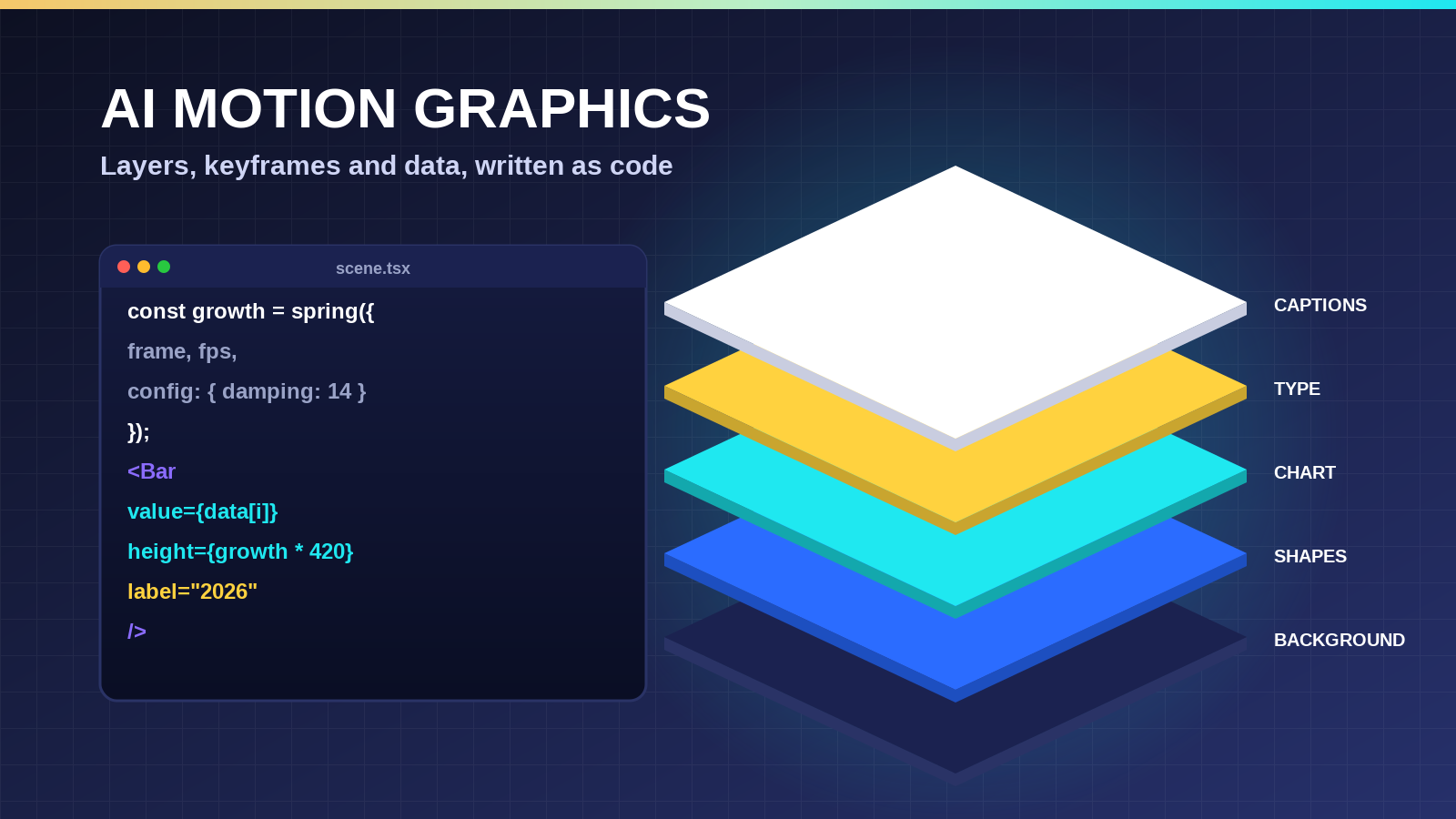
Animated explainers used to mean After Effects, a lot of keyframes and a lot of hours. In 2026 a growing number of creators make them a different way: an AI agent writes the animation as code, and a renderer turns that code into video. You describe the scene; the agent places every element, times every move and exports the MP4. This guide explains how it works, what it's good at, and how to get output that looks designed instead of generated.
What "AI motion graphics" means here
There are two things people mean by AI motion graphics:
- Generated: a video model invents the animation from a prompt. Quick, but text, numbers and exact layouts are unreliable.
- Coded: an AI agent (we use Claude Code) writes the animation in a language like HTML/CSS, React or Python, and a renderer captures it frame by frame. Every word, number and position is exactly what you asked for.
This article is about the second kind. For explainers, where the whole point is a clear number, a readable label or a diagram that builds step by step, exact beats impressive. (For a broader comparison with generators and 3D, see AI animation for YouTube.)
Why code beats keyframes for explainers
- Revisions are edits, not rebuilds. "Change 3.4 to 3.6" is one value. In a keyframe tool it can mean re-timing a whole chart.
- Everything is a template. Once your title card, chart and caption style exist, every new video reuses them. Your channel gets a consistent look for free.
- Timing can follow the voice. With word-level timestamps from the voice track, each element can appear exactly when it's mentioned.
- Batches are possible. The same component can render ten versions with ten datasets or ten languages.
The trade-off: you give up direct manipulation. You can't grab a shape and drag it; you describe where it goes. With an agent doing the typing, that turns out to be a smaller cost than it sounds.
The five building blocks
Nearly every explainer is assembled from the same handful of pieces. Build (or ask the agent to build) each one once, and new videos become assembly jobs.
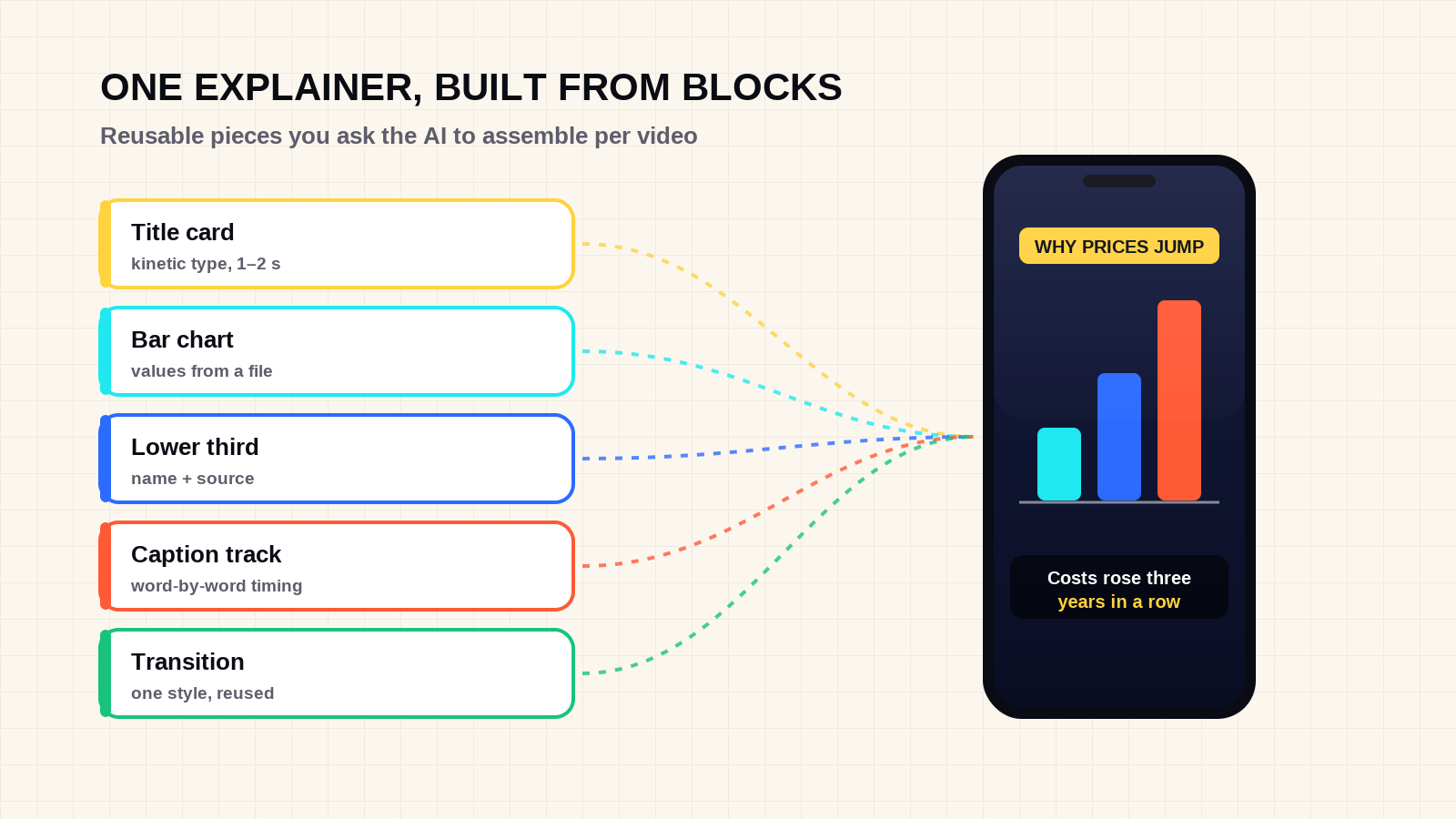
- Title card: big kinetic type for chapter starts, one to two seconds.
- Chart: bars, lines or a single big number, fed by a data file.
- Lower third: a label with a name, place or source.
- Caption track: words timed to the voice, highlighted as they're spoken.
- Transition: one style, reused everywhere. Five different transitions in one video look amateur.
Underneath, it's layers, just like a design tool: background, shapes, chart, type, captions, each animated on its own timeline.
Easing: the detail that makes it look pro
The fastest way to spot cheap motion graphics is linear movement: things slide at a constant speed and stop dead. Real objects accelerate and settle. In code, that's a single setting called easing, and it's worth naming in every prompt.
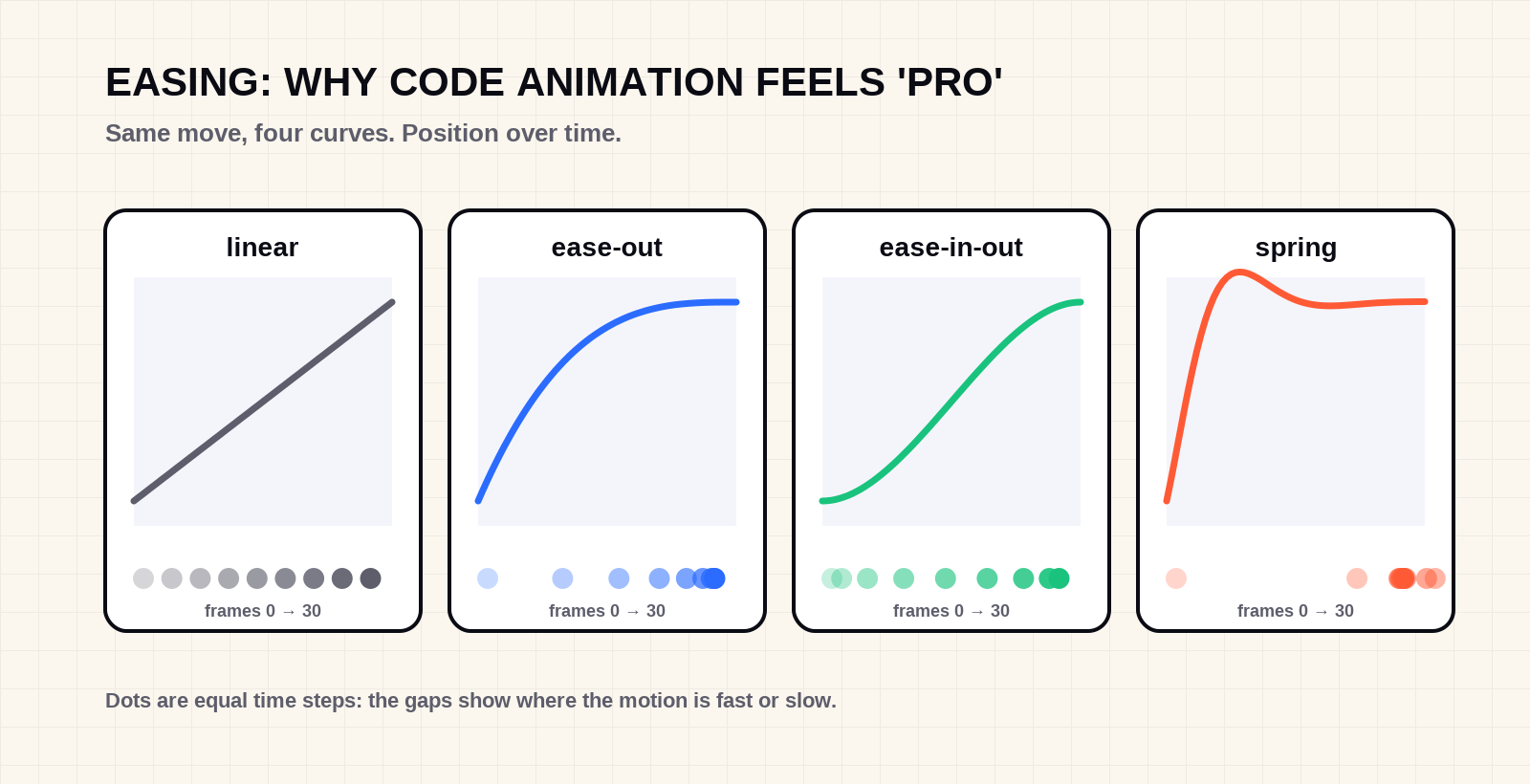
- Ease-out for things entering: fast start, gentle landing.
- Ease-in-out for things moving across the screen.
- Spring for playful pops, like a number that bounces in. Use sparingly.
- Linear almost never, except for continuous motion such as a ticking counter or a scrolling background.
A useful prompt line: no linear motion; ease-out on entrances, 0.4–0.6 s; stagger list items by 80 ms.
Data-driven graphics
This is where coded motion graphics pull far ahead. Put your numbers in a small data file, and the chart component reads it. Change the data, re-render, done.
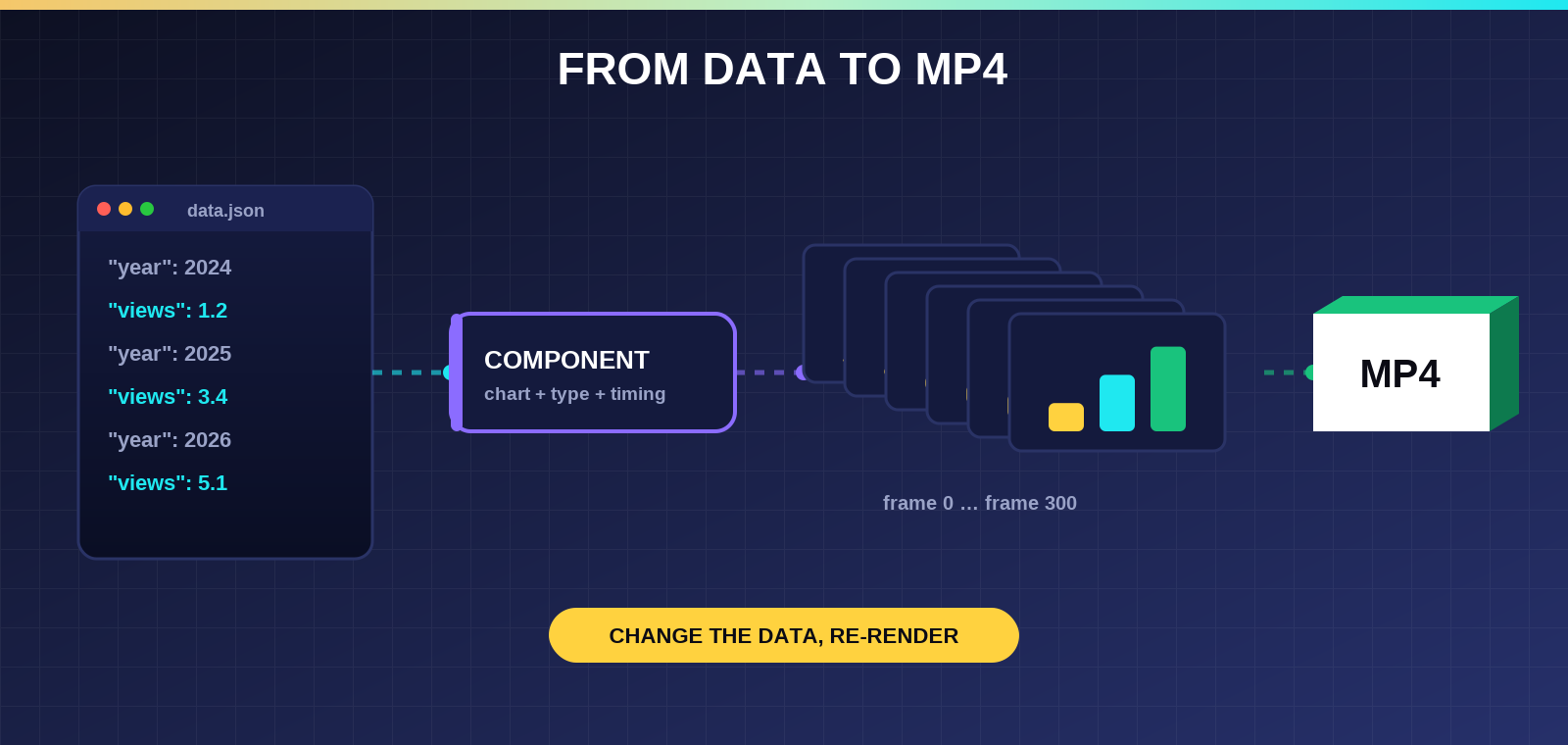
It also helps accuracy. When numbers live in one file with a source next to each, you can check them before rendering, instead of hunting through a timeline for a typo. Always ask the agent to put a source note in the data file, and check it yourself: AI can and does get numbers wrong.
Start from a working engine
The Starter kit gives you a code-based animation engine with characters, captions and camera moves already built, plus the blueprint and prompts. Claude Code installs it and renders a test with you.
See the Starter kit, $19One-time payment. Requires Claude Pro ($20/month).
Worked example: a 60-second explainer
Here's the order we follow for a short explainer. Times are rough and assume the building blocks already exist.
1. Script with beats (10–20 min)
Write (or co-write with Claude) a script where each sentence is one visual beat: "Prices rose three years in a row" → bar chart. If a sentence has no visual, cut it or give it one.
2. Voice first (5–15 min)
Record or generate the voice-over before animating. The voice sets the timing; animating to a guess and then fitting the voice is backwards. A free open-source voice is fine for a first test.
3. Ask for the scene plan, then the code
Here is the script and voice.wav. Plan the video beat by beat: which block, what text, what data, when it appears (use the word timestamps). Show me the plan as a table first. After I approve, build it at 1080x1920, 30 fps, our brand colors, ease-out entrances.
Approving a plan is far faster than correcting a finished render.
4. Check stills, then render
Ask for still frames at the key beats (for example, the moment each chart finishes) before the full render. Fix layout issues on stills; it's much cheaper. Then render the whole thing. Longer videos render much faster in the cloud than on a laptop; see rendering videos in the cloud.
5. Watch at full speed
Check that every number matches the voice, captions are readable on a phone, and nothing sits under the app's buttons.
Which frameworks agents use
| Approach | Examples | Good for |
|---|---|---|
| HTML/CSS rendered to video | Various HTML-to-video renderers | Kinetic type, captions, UI-style explainers |
| React components | Remotion | Reusable templates, data-driven series |
| TypeScript scene graphs | Motion Canvas | Diagrams and precise sequenced animation |
| Python math animation | Manim (Community Edition) | Equations, geometry, technical explainers |
You don't need to pick one yourself; describe the video and let Claude Code propose a stack, but do check its license. Remotion, for instance, is free for individuals and companies with up to three people and requires a paid license for larger companies. The open-source ones above use permissive licenses, but verify the current terms. Our Claude AI YouTube automation guide shows how an agent sets this up from an empty folder.
Lock your style in one file
The reason many AI-made explainers look generic is that every video is styled from scratch, by whatever the model defaults to. Fix that once: ask the agent to create a single style file that every scene must import. It should hold:
- Palette: background, text, and three accent colors, with one reserved for "the important number".
- Type: one display font for titles, one readable font for labels and captions, with sizes for 16:9 and 9:16.
- Motion: default easing, entrance duration, stagger delay and the one transition you use.
- Layout: margins and the caption safe zone for vertical video.
Then add a line to every prompt: use only values from style config; don't invent new colors or fonts. That one rule does more for a professional look than any individual effect, and it makes your channel recognizable at thumbnail size.
Check fonts too: use fonts with a license that allows video use (many open fonts do), and keep the font files inside the project so cloud renders look identical to local tests.
Mistakes that make it look cheap
- Everything moves at once. Stagger entrances. The eye should know where to look.
- Too many fonts and colors. Pick two fonts and a five-color palette, and put them in one config file.
- Text too small for phones. Most viewing is on a phone. If you can't read it at arm's length, it's too small.
- Animation without meaning. Movement should point at the idea. A spinning icon that says nothing is noise.
- Unchecked numbers. One wrong statistic damages trust more than a plain design ever will.
FAQ
Can AI make motion graphics?
Yes, in two ways. Video generators can invent animation from a prompt, but text and numbers are unreliable. An AI agent like Claude Code can write motion graphics as code, which gives exact text, data and timing, then render them to MP4.
Do I need After Effects for animated explainers?
No. Code-based frameworks render HTML, React or Python animation straight to video. An AI agent writes the code from your description, and you review stills and the final render.
What is the best framework for code-based motion graphics?
It depends on the job: React-based Remotion suits reusable templates, Motion Canvas suits precise diagrams, Manim suits math and technical explainers, and HTML-to-video renderers suit kinetic type and captions. Check each license.
How long does it take to make a 60-second explainer this way?
Once your building blocks exist, roughly an hour or two including script, voice, review and render is realistic. The first video takes longer because you're building the blocks.
Are AI motion graphics allowed to be monetized on YouTube?
Yes. Animated explainers are monetized like any other video. YouTube excludes mass-produced or repetitive content, so each video needs its own script and value, not just new numbers in the same template.
Make the explainer, not the busywork.
Get the engine, the blueprint and the prompts, and let Claude Code handle the keyframes.
See the Starter kit, $19One-time payment. Requires Claude Pro ($20/month).