
Rendering · Cloud
Render videos in the cloud: why your laptop is slow and what it costs
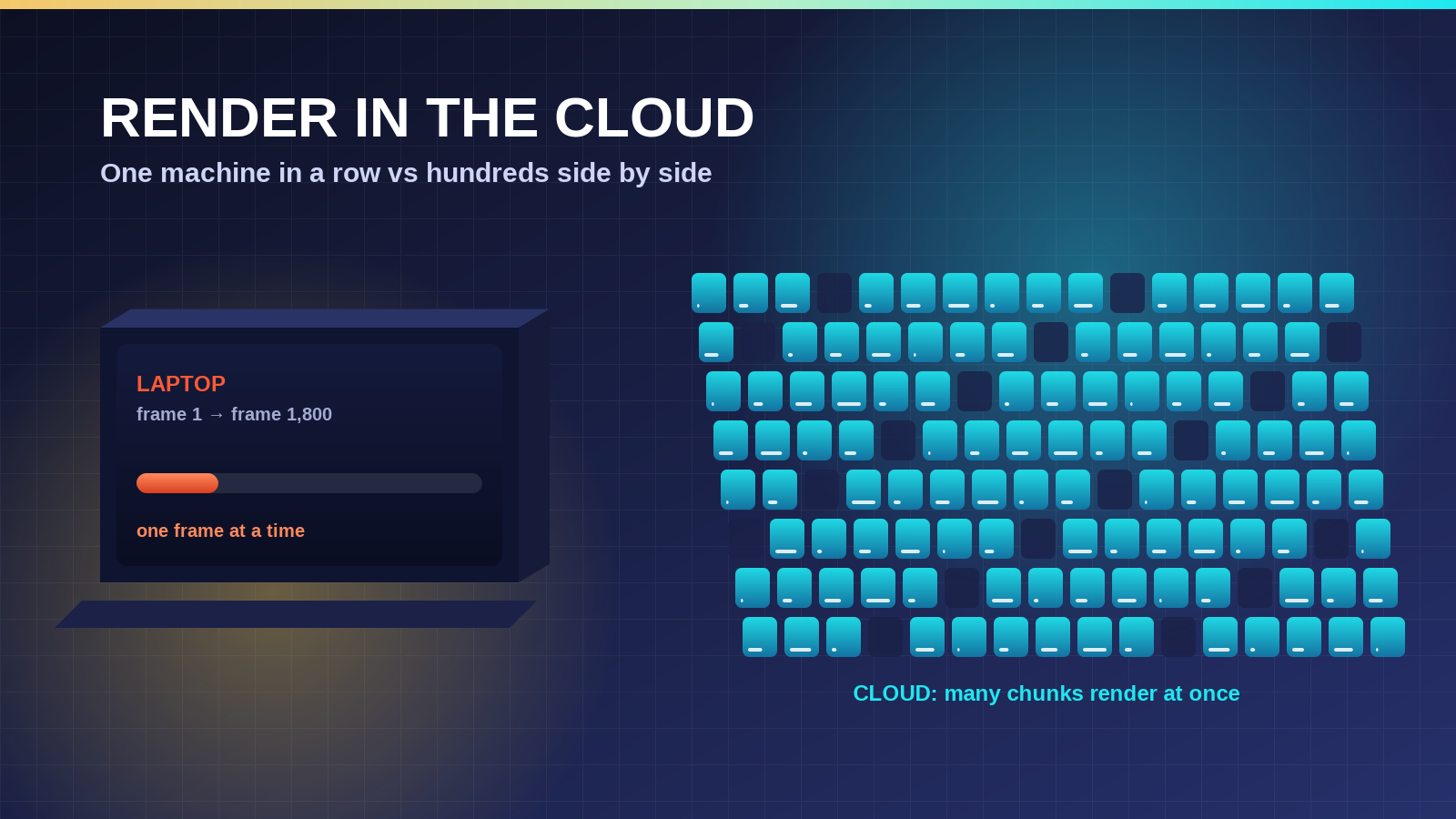
You finish an animated video, press render, and your laptop fan spins for longer than the video took to write. Code-based video engines are fast to edit and slow to render, because every frame is drawn from scratch. The fix isn't a faster laptop. It's splitting the video into chunks and rendering hundreds of them at the same time in the cloud. Here's how that works, what it costs in real numbers, and when it isn't worth it.
Why your laptop is slow
A video editor plays clips that already exist. A code-based engine (the kind an AI agent can drive) creates every frame: it lays out the scene, positions characters, draws text and effects, then captures the result as an image and encodes it. Many engines do this inside a headless browser, which is flexible but heavy.
Now do the math. A one-minute video at 30 frames per second is 1,800 frames. A 10-minute video is 18,000. Even at a fraction of a second per frame, one machine processing frames in order takes a long time, and your laptop is also running everything else you have open, often throttling when it gets hot.
Buying a faster computer helps a bit. It doesn't change the shape of the problem: one machine, one long queue.
Parallel chunked rendering, explained
The frames of a video don't depend on each other: frame 900 can be drawn without drawing frame 899 first. That makes rendering a perfect job for parallel computing.
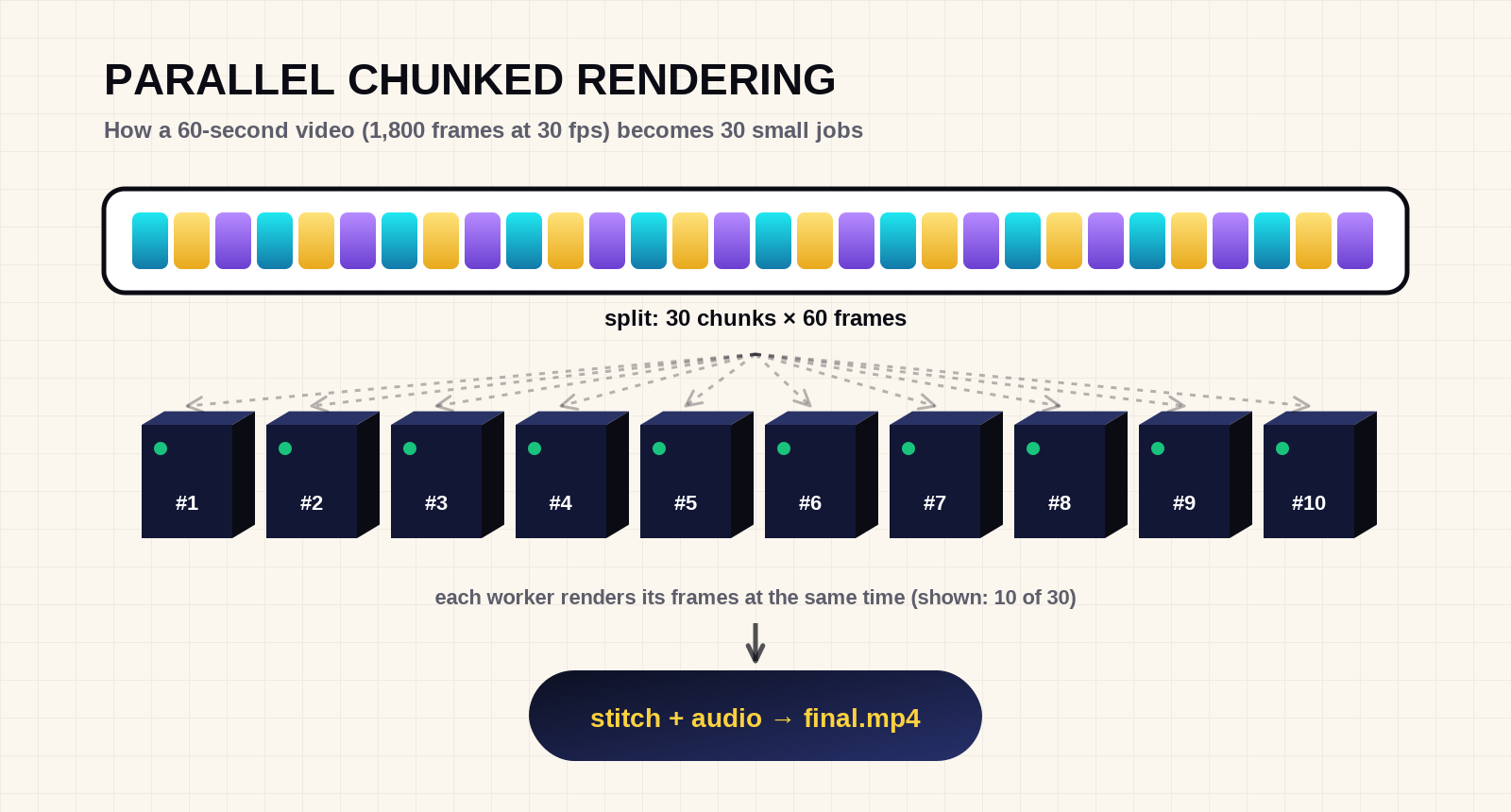
- Split. The renderer divides the timeline into chunks, for example 30 chunks of 60 frames for a one-minute video.
- Fan out. It starts one short-lived cloud function per chunk. Each one loads the project, renders only its frames and encodes a small video piece.
- Stitch. A final step joins the pieces in order, adds the audio and saves the finished MP4 for download.
Because the chunks run at the same time, the total wait is roughly the time of one chunk plus the overhead of starting up and stitching. That's why a Short can finish in about the time it takes to make a coffee.
Why not a million tiny chunks?
Every chunk has a fixed startup cost: launching the function, loading the browser, fetching fonts and images. With chunks that are too small, you spend more time starting up than rendering. With chunks that are too big, you wait on a few slow workers. Renderers pick a sensible size and cap how many run at once. In our setup each render uses up to 256 parallel chunks; longer videos get bigger chunks rather than more of them.
Cloud functions have limits. AWS Lambda, for example, stops any single run after 15 minutes. Chunk sizes are chosen so every piece finishes well inside that limit, which is also why very long videos are sometimes rendered in parts.
Our own timings
These are our measurements on our own projects, not a benchmark. Your numbers will depend on the engine, resolution, effects and your machine.
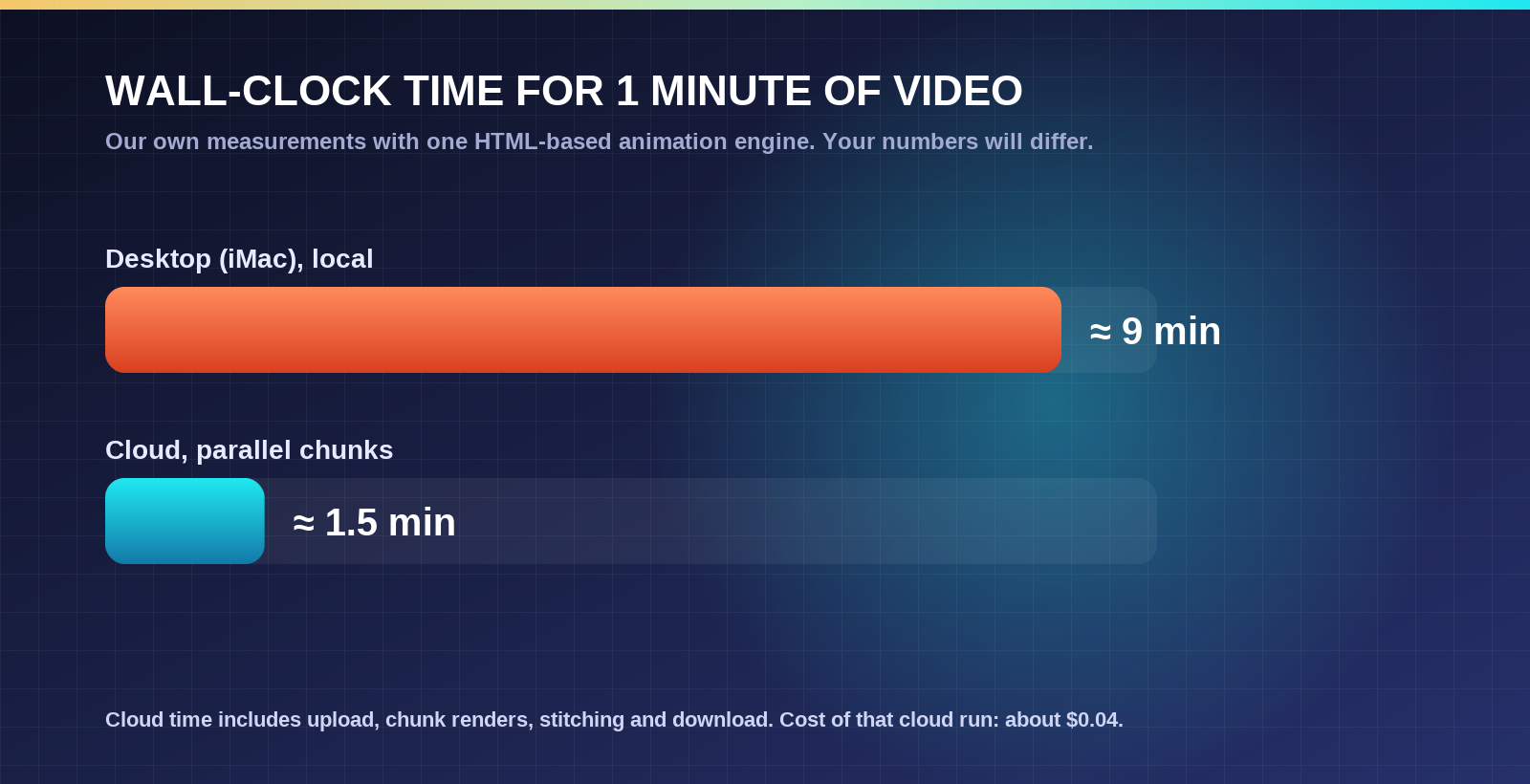
- Local, on a desktop iMac: about 9 minutes of rendering for each minute of finished video with our HTML-based engine. A 15-minute episode would tie up the machine for over two hours.
- Cloud, chunked: a 60-second vertical Short comes back in about a minute and a half, including upload, rendering, stitching and download.
The bigger win isn't the minutes saved per video. It's that your computer stays free. You can keep writing the next script while the current one renders.
What it costs (with the math)
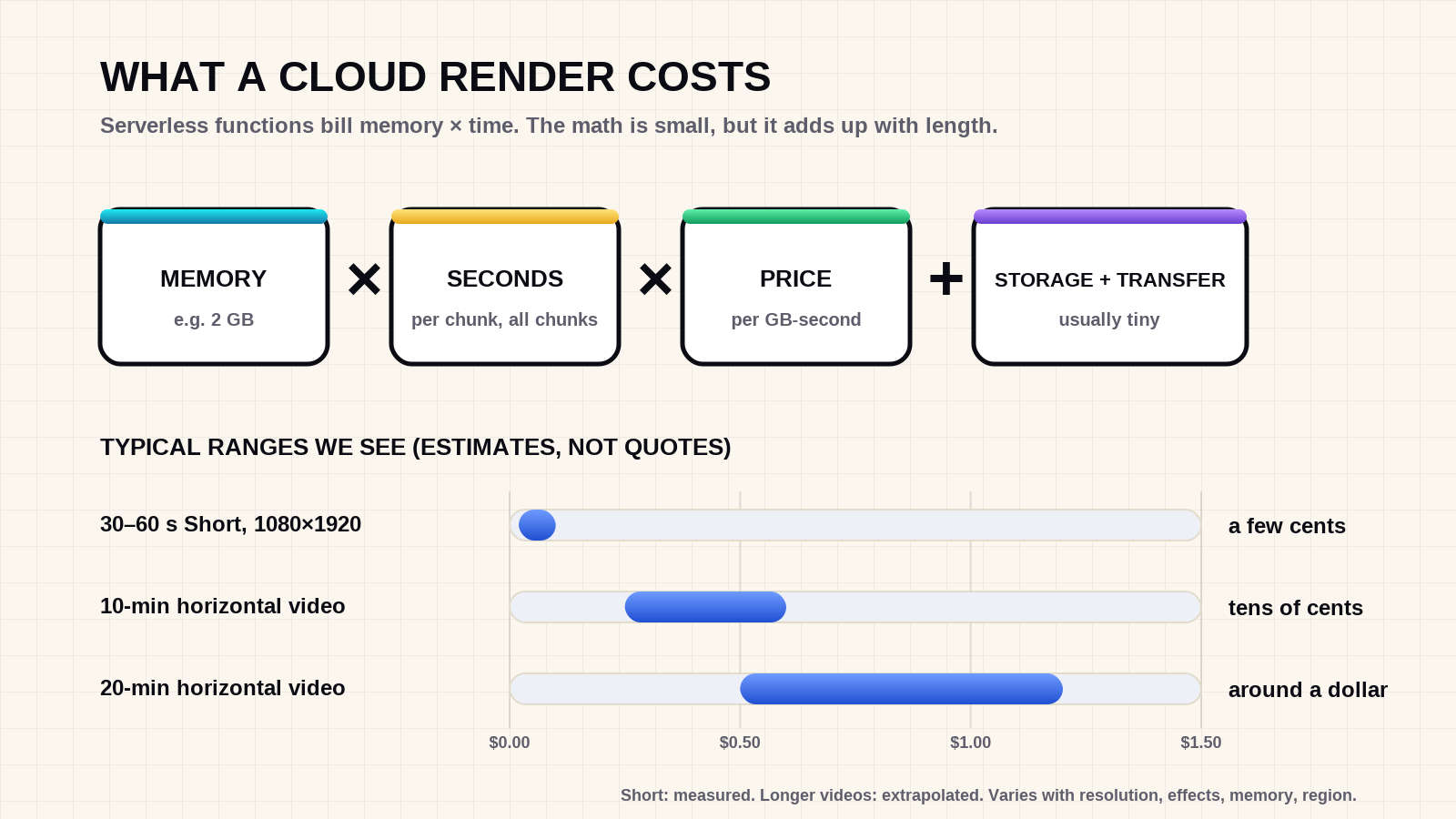
Serverless functions bill for memory × time, measured in GB-seconds, plus a tiny charge per request. On AWS Lambda's pricing page, the x86 rate in US East is listed at $0.0000166667 per GB-second and $0.20 per million requests, with a monthly free tier of 400,000 GB-seconds and 1 million requests. Other regions and providers differ.
A worked example that matches what we see for a Short:
30 chunks × 40 seconds each × 2 GB memory = 2,400 GB-seconds 2,400 × $0.0000166667 ≈ $0.04 + 31 requests ≈ $0.00001 + storage and download of a small MP4 ≈ fractions of a cent
So the honest range for a 30–60 second Short is a few cents, and it scales roughly with length and visual complexity: tens of cents for a 10-minute horizontal video, around a dollar for a 20-minute one in our estimates. Heavy effects, 4K or a high memory setting push it up. Some renderers print an estimated cost after each render; ours does, and it's worth reading.
The free tier can cover a lot of Shorts in a month, but don't plan around "free". Set a billing alert in your cloud account on day one, so a mistake (like a loop that renders the same video 200 times) can't surprise you.
Skip the cloud setup weeks
The Starter includes the engine and the step-by-step blueprint we use: Claude Code sets up cloud rendering on your own account with you and renders your first Short in a couple of minutes.
See the Starter kit, $19One-time payment. Requires Claude Pro ($20/month).
Ways to render in the cloud
| Option | Best for | Watch out for |
|---|---|---|
| Serverless chunked rendering (e.g. Remotion Lambda, HyperFrames Lambda) | Code-based animation; Shorts and long videos; pay only while rendering | Account setup, per-function time limits, each tool's own license terms |
| A rented cloud machine (VM or GPU) | Heavy 3D or long renders that don't split well | You pay while it's on, even idle; you manage it |
| Hosted render services | No setup at all | Monthly fees, less control, your files on someone else's platform |
For the stick-figure and motion-graphics videos we make, serverless chunked rendering is the sweet spot: no server to babysit, and the bill tracks exactly what you render. If you're curious how the rendering step fits into the whole pipeline, read Claude AI YouTube automation and YouTube Shorts automation.
Pitfalls that cost time or money
- Fonts that exist only on your computer. Cloud workers don't have your system fonts. Bundle every font file with the project, or the render will silently fall back to a default font.
- Huge assets. Every worker downloads the project. A folder full of unused 4K footage makes every chunk slower. Upload only what the video uses.
- Rendering to check one frame. For reviews, render a still or a low-resolution preview locally. Save full cloud renders for versions you might publish.
- Forgotten files. Old renders and uploads sit in storage and cost a little every month. Clean up, or set an automatic expiry.
- Leaked keys. Cloud access keys are like a credit card. Never paste them into a chat, a public repo or a shared doc.
- Loudness and sync. Check the final MP4, not just the preview. Stitching is reliable, but always watch the start and end of each video before uploading.
When local rendering is still fine
Cloud rendering isn't always the answer:
- Quick tests of a few seconds render fine locally, with no upload.
- Still frames for review sheets and thumbnails are near-instant on any machine.
- No internet or no cloud account yet? Render locally overnight while you learn the rest of the workflow.
A good rule: preview locally, publish from the cloud. If you're new to the whole process, start with our AI video workflow before optimizing the render step.
A first-week setup checklist
- Create your own cloud account and turn on two-factor sign-in. Don't render on someone else's account.
- Set a billing alert at a small amount, for example a few dollars, before your first render.
- Pick one region close to you and keep everything (functions, storage) there. Mixing regions adds transfer costs and confusion.
- Create a dedicated access key with only the permissions the renderer's docs ask for, and store it in a local config file that never gets shared or committed.
- Deploy the renderer following its official docs, or let an agent like Claude Code run the steps while explaining each one.
- Render a 5-second test, then a full Short. Compare the cloud MP4 with your local preview at the start, the middle and the end.
- Write down your numbers: render time and the cost shown for that render. After ten videos you'll know your own range, which beats any article, including this one.
FAQ
How much does it cost to render a video in the cloud?
With serverless rendering you pay for memory multiplied by seconds of compute, plus small storage and transfer costs. In our own setup a 60-second vertical Short costs about four cents to render; longer and heavier videos cost proportionally more.
Why is rendering so slow on my computer?
A code-based animation engine has to draw every frame, often by loading it in a browser and taking a screenshot, then encode it. A one-minute video at 30 fps is 1,800 frames, rendered one after another on one machine.
Is cloud rendering safe for my files?
Your project files are uploaded to your own cloud account (for example an AWS storage bucket) and rendered there. Use your own account, keep access keys private, and delete old renders and uploads you don't need.
Do I need to know how to code to render in the cloud?
Not necessarily. Tools like Remotion Lambda or HyperFrames Lambda handle the splitting and stitching, and an agent like Claude Code can set up the account, deploy the renderer and run the command with you, explaining each step.
What is AWS Lambda's role in video rendering?
Lambda runs short functions on demand. A renderer starts many of them at once, each rendering a small range of frames, and then stitches the pieces into one MP4. You pay only while they run.
Render while you write the next one
Get the engine, the blueprint and the prompts we use for our own channels, including the cloud render setup.
See the Starter kit, $19One-time payment. Requires Claude Pro ($20/month).