
Workflow · Idea to upload
The AI video workflow: from idea to upload in one afternoon
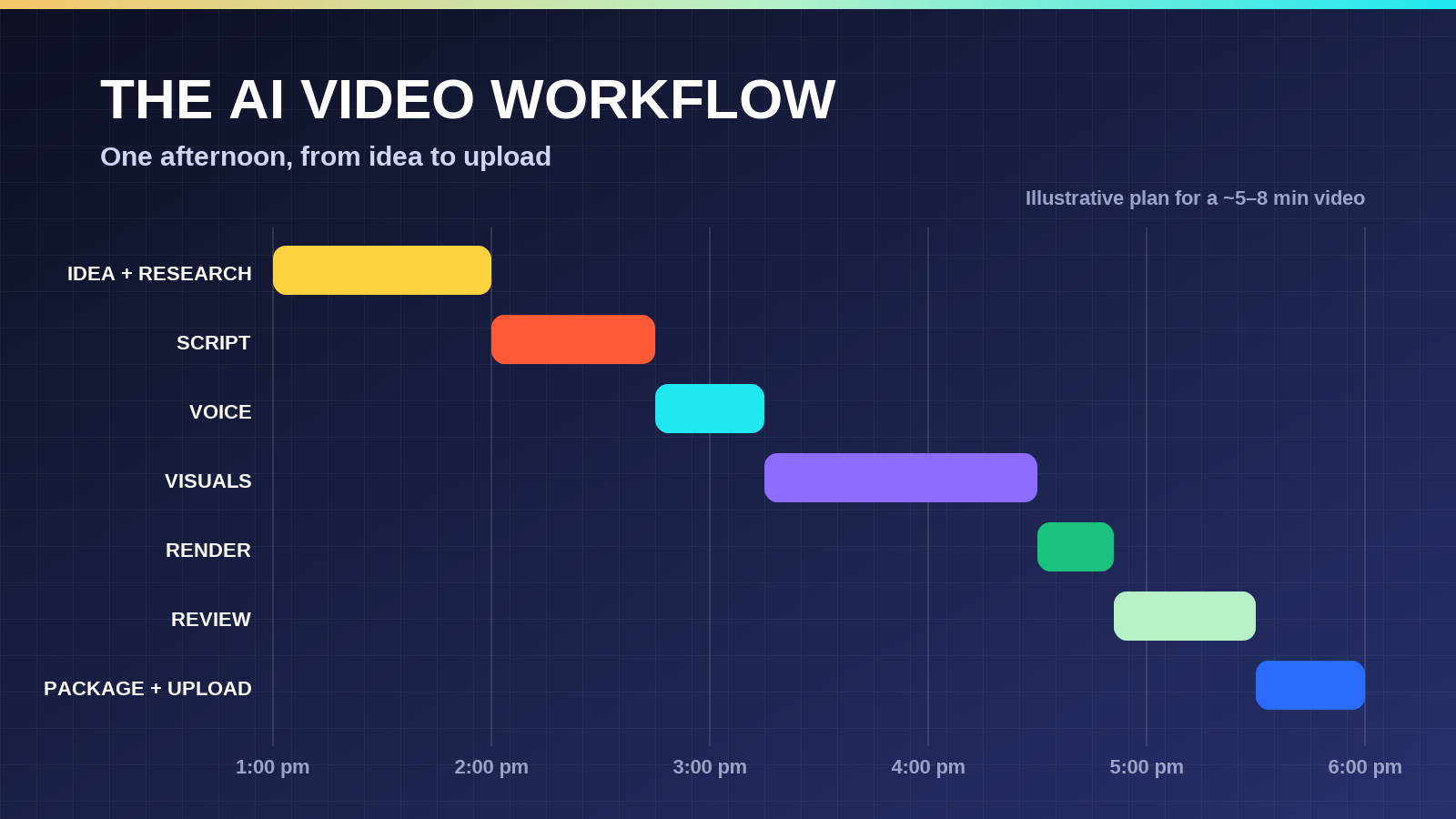
Most AI video advice is a pile of tools. What actually saves time is an order of operations: which step comes first, what each step hands to the next, and where a human has to stop and check. This is the AI video workflow we use to take one video from a blank page to a scheduled upload in an afternoon, for a short-to-medium faceless video of roughly 5 to 8 minutes, or a batch of Shorts.
The afternoon at a glance
The schedule in the image above is illustrative; your first run will take longer, and that's normal. Here's what each block contains:
| Time | Step | AI does | You do |
|---|---|---|---|
| ~1:00 | Idea + research | Keyword data, outline, source list | Pick the angle, verify sources |
| ~2:00 | Script | Draft in beats | Read it aloud, cut 20% |
| ~2:45 | Voice | Text-to-speech, or cleanup of your recording | Listen for mispronunciations |
| ~3:15 | Visuals | Scenes, charts, captions in code | Approve the scene plan and stills |
| ~4:30 | Render | Cloud or local render | Nothing (take a break) |
| ~4:50 | Review | Fix notes you give it | Watch the whole thing |
| ~5:30 | Package + upload | Title options, description, chapters, SRT | Choose the title, upload, schedule |
The eight steps, one by one
1. Idea: start from demand, not inspiration
Before writing a word, check that people search for the topic. A keyword tool (we use vidIQ; others work) tells you roughly how much search a phrase gets and how crowded it is. Look for a topic with steady interest and an angle the top videos missed. Ten minutes here can save the whole afternoon.
2. Research: sources before sentences
Ask Claude to outline the topic and list where each claim should come from. Then open those sources yourself. AI is good at structure and bad at being trusted blindly with facts, dates and numbers.
3. Script: written for the ear, in beats
Ask for a script split into beats: one sentence, one visual. Hook in the first few seconds, one idea per beat, a payoff at the end. Then read it aloud and cut what you stumble on. Spoken scripts are shorter than they look on paper.
Write a 6-minute script on [topic] for a faceless explainer. Format: a table with beat number, narration (max 2 sentences), and the visual for that beat. Open with the most surprising fact. Mark every number with [SOURCE?] so I can verify it.
4. Voice: lock the audio
Generate the voice-over (or record it) and lock it before any animation. More on why below. Free open-source voices are fine to start; premium voices add expression when a channel grows.
5. Visuals: plan, stills, then build
Have the agent turn the script table into a scene plan, approve it, then ask for still frames of the key moments before a full render. With a code-based engine, Claude Code builds the scenes; we explain that approach in Claude AI YouTube automation and the motion-graphics side in AI motion graphics with code.
6. Render: in the cloud if it's long
Animated video renders slowly on a laptop. A cloud render splits the video into chunks and renders them in parallel, which turns a long wait into a few minutes, usually for small change.
7. Review: watch it all, at full speed
Not skimming. Watching. Write timestamped notes ("2:14 caption covers the chart") and hand them to the agent in one batch.
8. Package and upload
Title, thumbnail, description, chapters and the caption file. AI can generate options quickly; your job is to choose. Upload through YouTube Studio yourself, and schedule rather than publish at random hours.
For videos over a few minutes, add chapters (timestamps in the description starting at 0:00). They help viewers jump around and can show up in search. Claude can draft them from the script table you already have, since each beat already has a start time once the voice is locked. Upload the .srt caption file too, rather than relying only on automatic captions: you've already checked it, and it's more accurate.
Want the visuals step pre-built?
The Starter kit is our code-based animation engine plus the blueprint and prompts for this workflow. Claude Code installs and tests it with you, so step 5 starts from a working setup.
See the Starter kit, $19One-time payment. Requires Claude Pro ($20/month).
Why the voice comes before the pictures
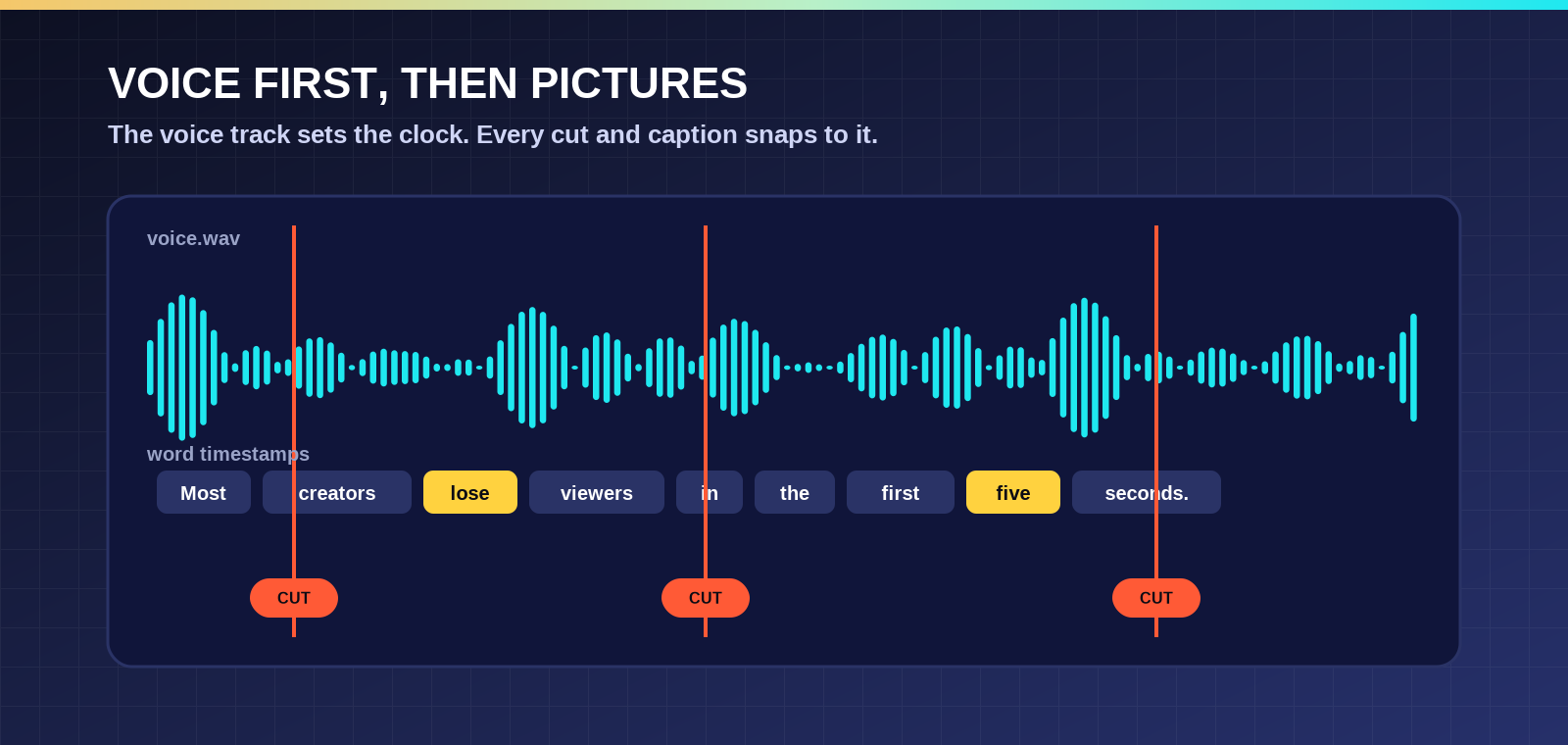
If you animate first and fit the voice later, everything drifts: captions lag, charts appear before they're mentioned, cuts land mid-word. If you lock the voice first and get word-level timestamps from a speech-to-text pass, every visual can snap to the exact word that introduces it. That's the single biggest quality jump in an AI video workflow, and it costs nothing.
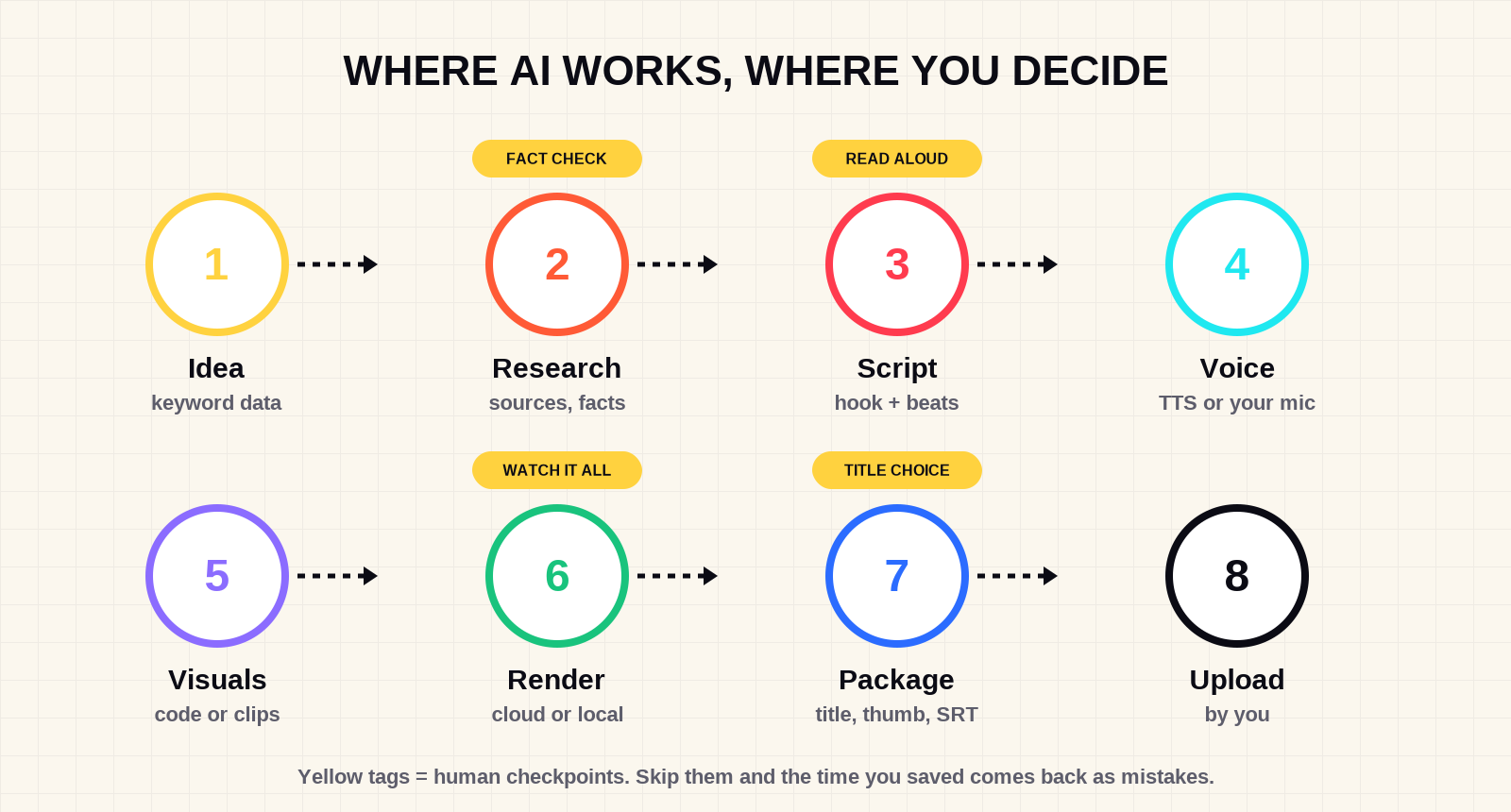
The four human checkpoints
Automation goes wrong quietly. These four stops catch most of it:
- Fact check (after research): every number and claim has a source you opened.
- Read aloud (after script): if it's awkward to say, it's awkward to hear.
- Watch it all (after render): full speed, sound on, on a phone if it's a Short.
- Title choice (packaging): you pick and edit the title; don't paste the first suggestion.
Why this matters for monetization: YouTube doesn't pay for inauthentic content, which it defines as mass-produced or repetitive videos. The checkpoints are what keep an efficient workflow from turning into a template factory.
The pre-upload dashboard
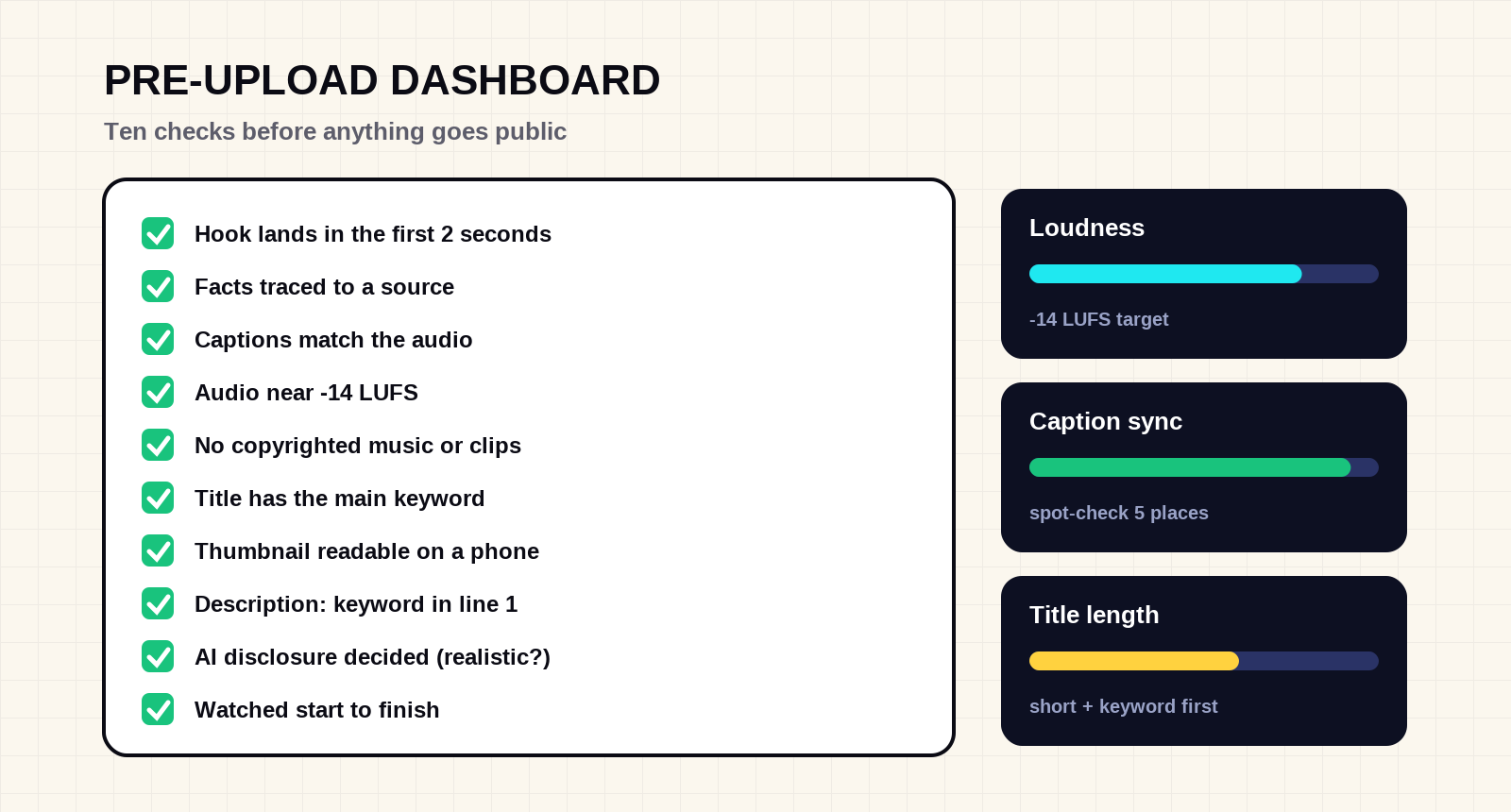
- The hook lands in the first two seconds.
- Every fact traces to a source.
- Captions match the audio (spot-check five places).
- Loudness around −14 LUFS, the level YouTube is widely reported to normalize to.
- No music or clips you don't have the rights to.
- The title contains the main keyword and reads naturally.
- The thumbnail is readable at phone size.
- The description has the keyword in the first line.
- AI disclosure decided: YouTube asks you to label realistic altered or synthetic content; clearly animated content generally doesn't need it.
- You watched it from start to finish.
What not to automate (yet)
Some steps look automatable and quietly hurt the channel when you hand them over completely:
- Choosing topics on autopilot. Keyword data tells you what people search; it doesn't tell you what you can say better than the top results. Keep the final pick.
- Auto-publishing. Scheduling is fine. A pipeline that uploads without anyone watching the file is how broken captions and wrong facts go public.
- Replying to comments with AI. Early comments are where you learn what viewers want. Read them yourself.
- Thumbnails without a look test. Generate options if you like, but view them at phone size next to competitors' thumbnails before choosing.
- Daily uploads before the format works. Volume amplifies whatever you have. Get one format right, then speed it up.
The rule of thumb: automate the making, keep the deciding. Every step in this workflow can be faster with AI, but the four checkpoints, the topic choice and the final watch are where your channel's judgment lives. They're also what makes each video yours rather than another output of the same template.
Making it repeatable
The afternoon gets shorter every time you run it, as long as you save what worked:
- One folder per video with the same subfolders every time (script, audio, renders, package).
- Saved prompts for each step, improved after every video.
- A notes file of mistakes ("captions too low on Shorts", "voice says 'GIF' wrong") that you give the agent at the start of the next run.
- Batching once it's stable: two scripts in one research block, four Shorts in one render. Our YouTube Shorts automation guide covers batching for Shorts specifically.
And if you want to pull your own published clips back from other platforms to reuse them, our free tools page handles that.
FAQ
What is an AI video workflow?
It's the order of steps for making a video with AI help: idea, research, script, voice, visuals, render, review and upload, with AI speeding up each step and a human checking the result at fixed points.
Can you really make a YouTube video in one afternoon with AI?
For a short-to-medium faceless video or a batch of Shorts, yes, once your setup exists. The first run takes longer because you're building templates and prompts.
Should I make the voice-over or the visuals first?
The voice first. Locking the audio and getting word-level timestamps lets every caption, cut and chart line up with the words that introduce it.
Which steps should never be fully automated?
Fact-checking, reading the script aloud, watching the final video and choosing the title. They catch the quiet errors automation makes and keep the channel from looking mass-produced.
Do I need to label AI-made videos on YouTube?
YouTube asks creators to disclose altered or synthetic content that looks realistic. Clearly animated or unrealistic content generally doesn't need the label. Check YouTube's current help page for your case.
One afternoon, one good video.
Get the engine, the blueprint and the prompts we use for this workflow, and run your first afternoon this week.
See the Starter kit, $19One-time payment. Requires Claude Pro ($20/month).