
Shorts · Automation
YouTube Shorts automation: what you can automate (and what you shouldn't)
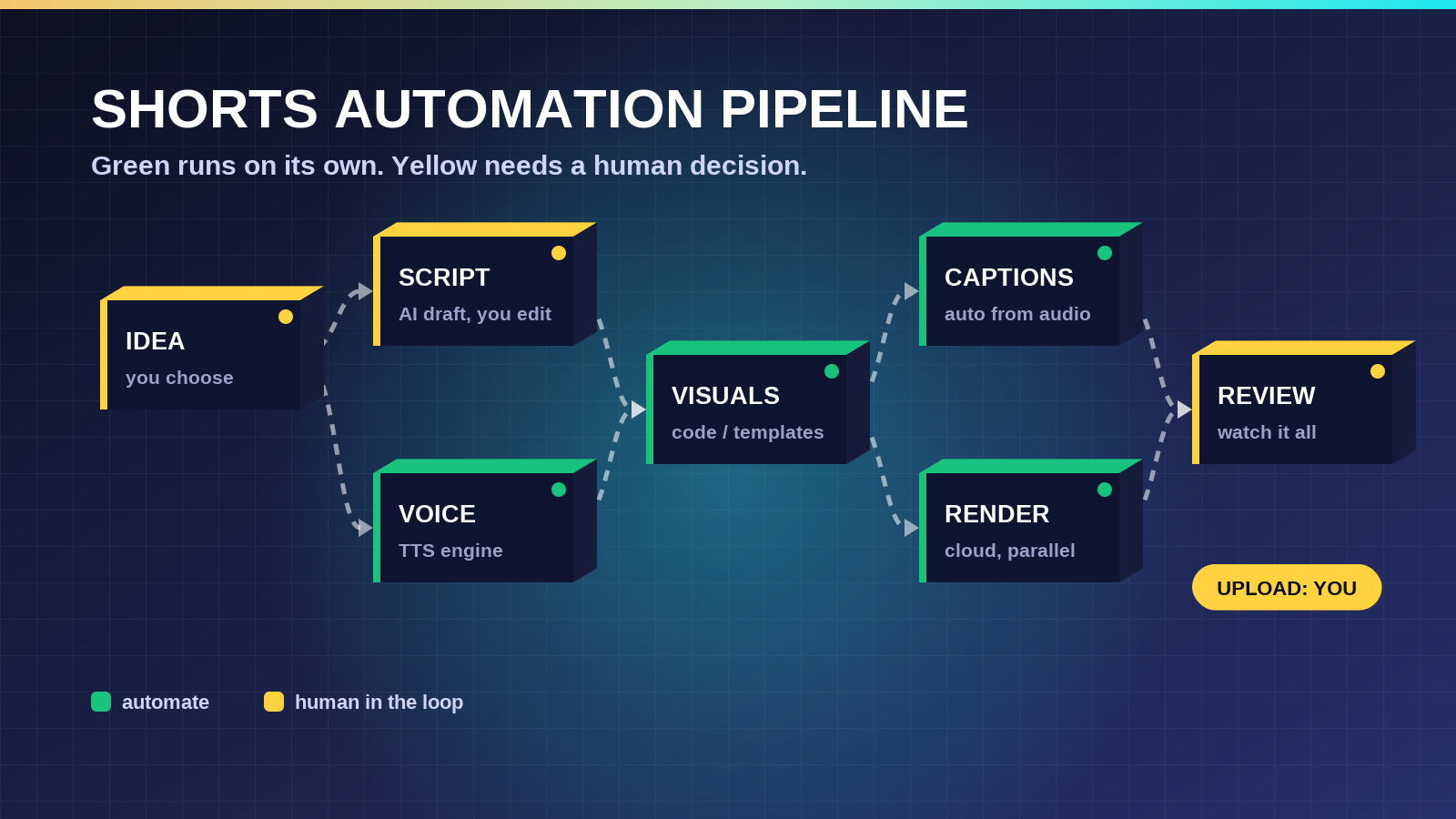
"Automate your Shorts" can mean two opposite things. One is a production line that frees you from repetitive work so you can spend more time on ideas. The other is a content farm that pushes out near-identical videos until YouTube stops paying or removes the channel. The difference is not the tools. It is which steps you hand to a machine. This is a task-by-task audit, with the steps worth automating, the ones that need a human gate, and the automations you should never build.
Two kinds of Shorts automation
Picture two channels that both call themselves "automated".
Channel A writes every idea by hand, drafts scripts with an AI assistant and edits them, then lets software generate voices, build scenes from a template of characters and sets, add captions and render. A person watches every Short before it goes out. Output: five Shorts a week from one person.
Channel B scrapes trending topics, has a model write fifty scripts a day, pastes them over stock footage with the same stock voice, and auto-uploads without anyone watching. Output: hundreds of Shorts a week that look like each other and like thousands of other channels.
Channel A is using automation as a production tool. Channel B is the exact pattern YouTube's inauthentic content policy describes: mass-produced or repetitive content, including AI-generated videos made from generic templates, which is not eligible for monetization. YouTube's spam policy separately describes using automated tools to churn out high volumes of similar content with minimal changes. The goal of this article is to help you build Channel A.
The task-by-task audit
Here is every task in a Shorts workflow, scored by how much of it a machine can reasonably carry today. "Reasonably" means the output is good enough that a quick human check is all it needs.
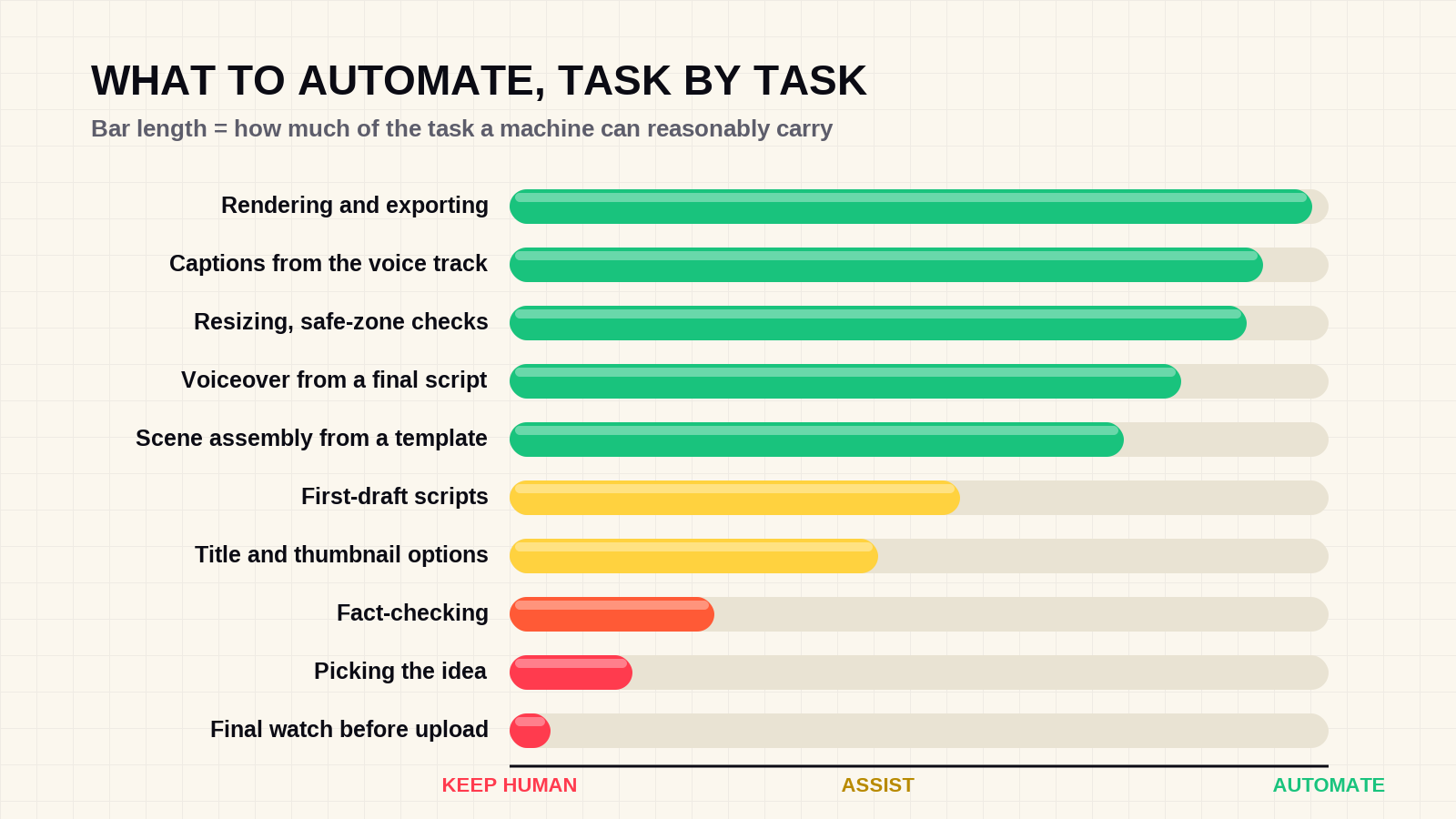
A pattern jumps out: the tasks that are easiest to automate are the ones viewers never notice when they're done right (export settings, caption timing, file sizes). The tasks that are hardest to automate are the ones viewers notice most (the idea, whether the facts are right, whether the joke lands). Automate from the bottom of the stack up, never from the top down.
Automate: the mechanical middle
These steps are repetitive, rule-based and identical in every Short. Automating them saves the most time with the least risk:
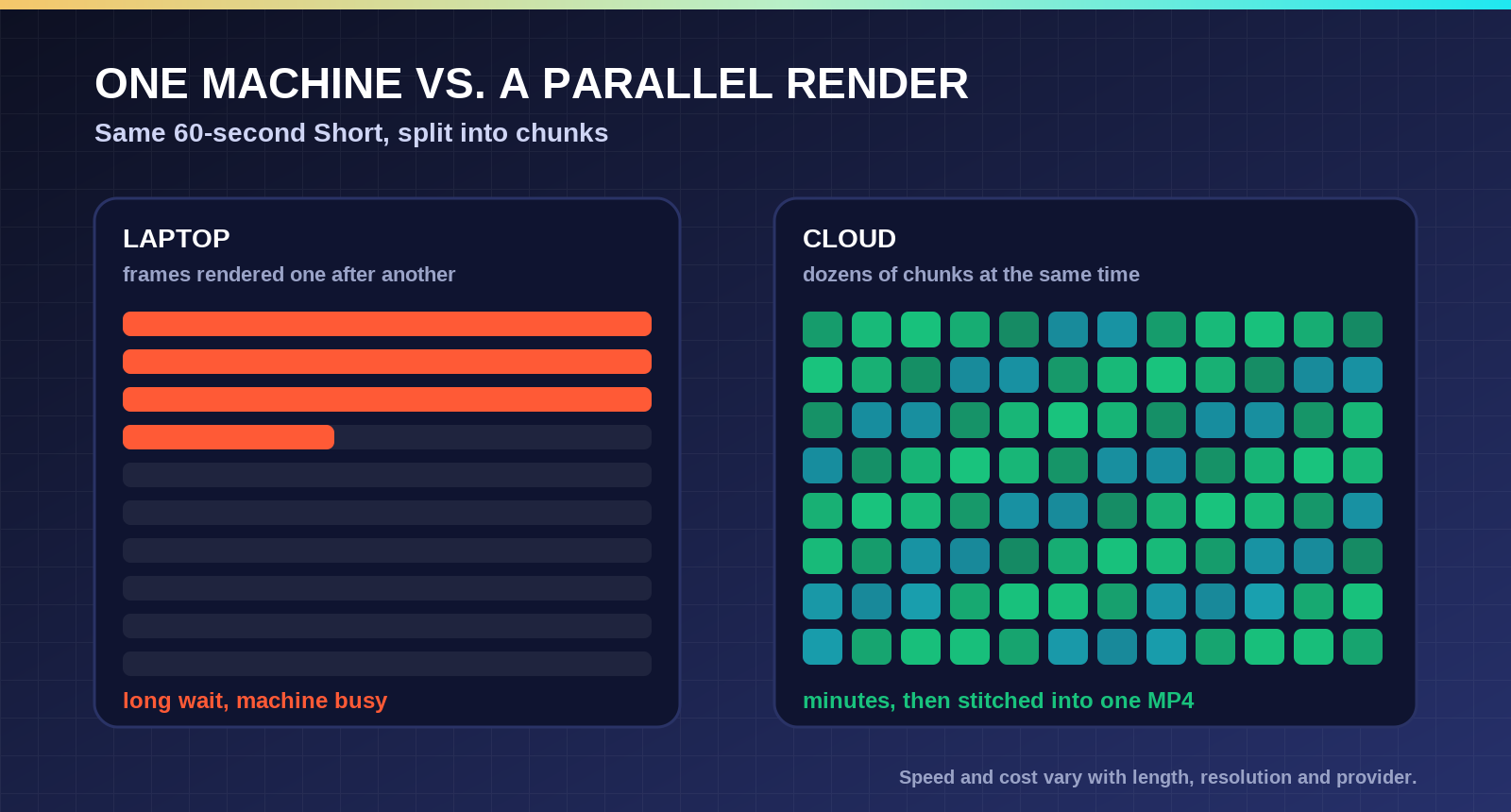
- Rendering and export. Once a Short exists as a project, turning it into a 1080×1920 MP4 is pure computation. A cloud render that splits the video into chunks and renders them in parallel turns a long local wait into a few minutes. Our guide to rendering videos in the cloud explains how it works.
- Captions from the voice track. If the voice is generated from a script, you already know every word and its timing. Captions can be generated from the same data, styled the same way every time and kept inside the safe zone automatically.
- Voiceover from a final script. Text-to-speech is reliable once the script is locked. Keep one voice per character or narrator so the channel sounds consistent.
- Scene assembly from your own template. Characters, sets, camera moves and transitions you designed once can be assembled from a script by code. This is what an agent like Claude Code does well: it writes the code that places each element, frame by frame.
- Checks. Resolution, duration, loudness, caption overlap with the player's interface, missing audio. A script can check all of these before a human ever looks.
Assist: AI drafts, you decide
For these tasks, AI is a fast first draft, and the draft is where the danger is. Used well, it saves time; used blindly, it makes every Short sound like every other Short.
- Scripts. Give the AI your format, your characters and one specific idea, and ask for a draft in scene language (what's on screen, what's said, one sound per cut). Then rewrite the hook and the ending yourself. Those two lines decide whether people stay.
- Titles and thumbnails. Generate ten options, pick one, adjust it. Shorts in the feed rarely show a thumbnail, but titles still matter for search and for the channel page.
- Fixing shots. When a scene looks wrong, describe the problem in plain language and let the agent fix the code. You judge; it edits.
A useful test: if you removed your channel name from five of your Shorts and mixed them with five from a competitor, could a regular viewer sort them? If not, you've automated too much of the creative layer.
Keep human: the gates
Three steps should always have a person's judgment on them. Think of them as gates the pipeline cannot pass without you:
- Picking the idea. Trend tools and keyword research can suggest topics, but choosing which story is worth 45 seconds of a stranger's time is the core creative decision of the channel.
- Fact-checking. Language models state wrong numbers with total confidence. Any Short with a fact, a date, a price or a quote needs a source you checked.
- The final watch. Watch every Short on a phone, with sound, before it goes out. A broken caption, a cut-off word or an awkward pause costs more than the minute it takes to catch it.
Skip the weeks of wiring
The Starter kit is a ready Shorts pipeline: the animation engine, voice and caption wiring, and cloud render, set up on your computer by Claude Code. You keep the creative gates; the machine does the middle.
See the Starter kit, $19One-time payment. Requires Claude Pro ($20/month).
Never automate: what breaks the rules
Some automations aren't just a quality risk. They break YouTube's policies outright, and the usual result is demonetization, removal from the Partner Program or channel termination:
| Automation | Why not |
|---|---|
| Bots that like, comment, subscribe or view | YouTube's fake engagement policy prohibits artificially increasing engagement, including with automated systems or paid services. |
| Mass uploads of near-identical videos | Covered by the spam and inauthentic content policies: high volumes of similar content with minimal changes. |
| Auto-reuploading other creators' videos | Copyright claims and strikes, plus the reused content policy for monetization. |
| Auto-generated comments on other channels to "promote" yours | Spam, and a reliable way to make viewers dislike you. |
| Fully unattended publishing with no review | Not a rule by itself, but it is how the other problems reach the public. |
Scheduling is fine. YouTube Studio lets you set a publish time for each upload, and planning a week of Shorts in advance is normal practice. The line is between automating your production and automating the audience's reaction.
What an automated Shorts stack looks like
You don't need ten subscriptions. A working stack has five pieces:
| Piece | What it does | Options |
|---|---|---|
| Agent | Writes and runs the code that builds each Short | Claude Code (included with Claude Pro) |
| Engine | Your characters, sets, captions and camera, in code | Build your own with the agent, or start from a kit |
| Voice | Turns scripts into audio | Free open-source TTS, or a premium voice service |
| Render | Turns the project into an MP4 | Local for tests, cloud for speed |
| Review | You, a phone and headphones | Not optional |
The step-by-step setup of this stack is in our Claude AI YouTube automation walkthrough. If you're still choosing what to make, start with the faceless Shorts guide, then come back here.
Batching: the automation nobody talks about
The biggest time saver in Shorts isn't software. It's doing the same kind of work in one block instead of switching between tasks for each video. Write five scripts in one sitting and you stay in "writer" mode; render five in one go and the machine works while you do something else.
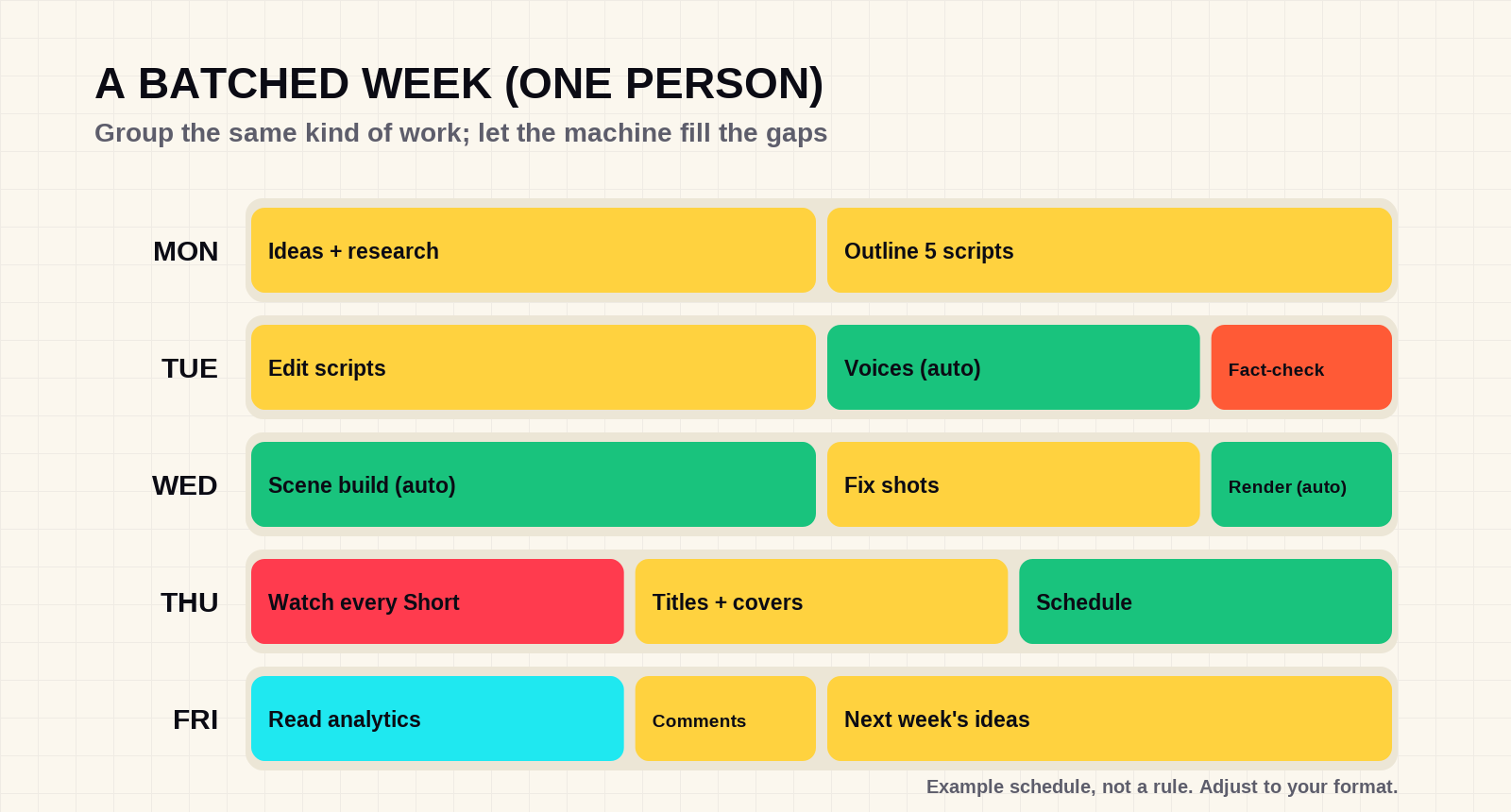
Batching also makes your automation better. When five Shorts go through the pipeline together, a bug in the caption style shows up five times and gets fixed once. When you make one Short at a time, the same bug quietly ships every day. If you're just starting, our free tools cover a few of the small jobs around this routine.
FAQ
Is YouTube Shorts automation allowed?
Using tools to produce videos is allowed. What YouTube does not allow is fake engagement, spam, and monetizing mass-produced or repetitive content. Automate production steps like voice, captions and render, and keep a human on the idea, the facts and the final review.
Can I fully automate a Shorts channel?
You can technically connect every step, but a channel with no human choosing ideas or reviewing videos tends to produce interchangeable content, which YouTube does not monetize. A human-in-the-loop pipeline is both safer and more likely to grow.
Which part of Shorts production should I automate first?
Start with rendering and captions. They are mechanical, identical in every video and easy to verify, so automating them saves time without touching the creative quality.
Is it OK to schedule Shorts in advance?
Yes. YouTube Studio lets you schedule uploads, and planning a week ahead is normal practice. Scheduling is different from bots that fake views, likes or comments, which break YouTube's fake engagement policy.
Do I need to code to automate Shorts?
No. An AI coding agent such as Claude Code writes and runs the code for you. You describe the result in plain English and review what it builds.
Automate the middle, keep the gates
Get the engine and blueprint we use, and let Claude Code handle setup, scenes and render while you focus on ideas and the final watch.
See the Starter kit, $19One-time payment. Requires Claude Pro ($20/month).