
Faceless YouTube · Shorts
Faceless YouTube Shorts: the complete 2026 guide
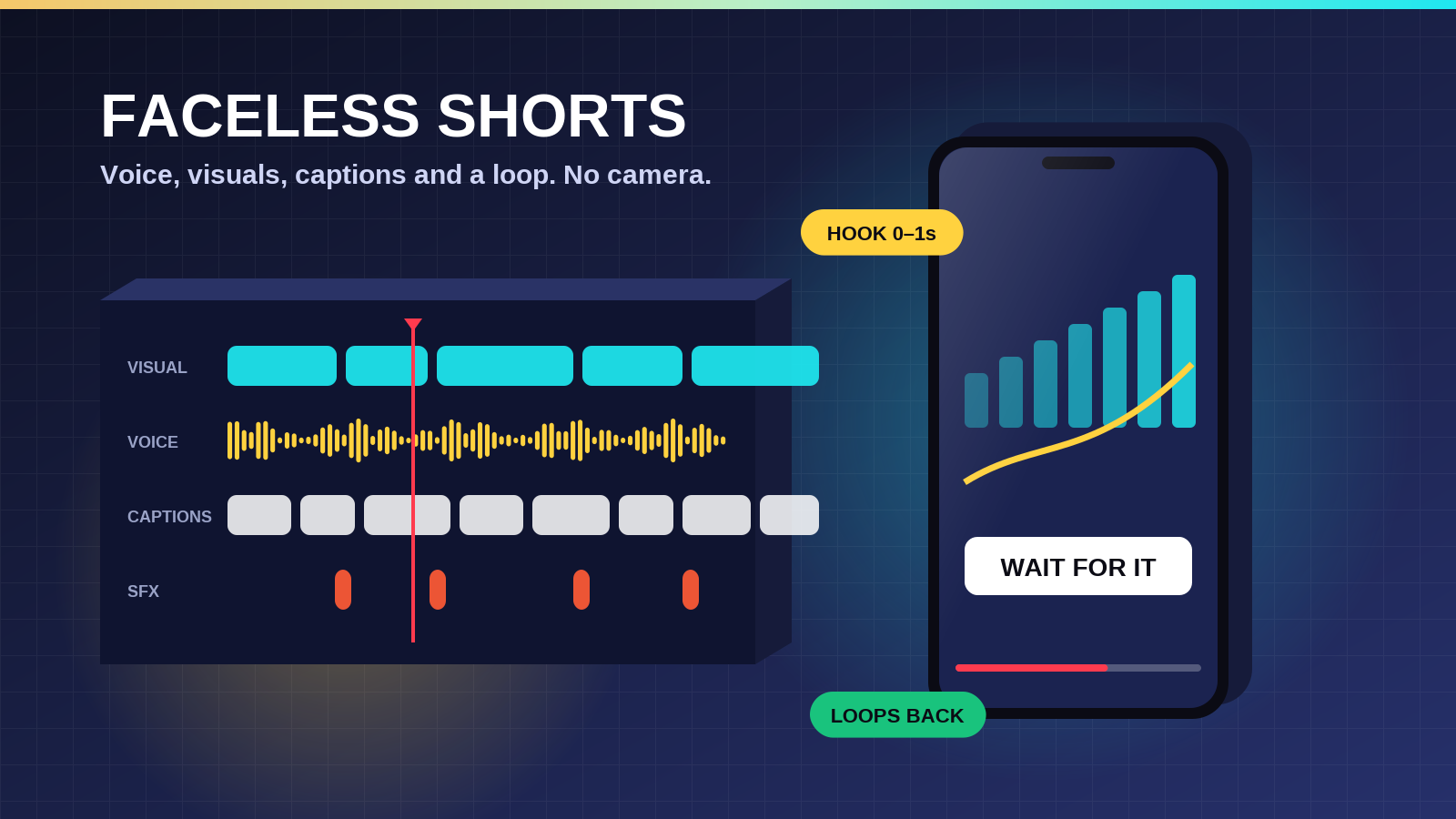
A faceless Short is not a video with the face cut out. It is a different kind of product: a 15-to-60-second story carried by a voice, visuals, on-screen text and sound, built so a stranger in a fast-scrolling feed stops, stays and watches again. This guide breaks a faceless Short into its parts, shows which formats are worth your time in 2026, and covers the YouTube rules that decide whether it can ever earn.
What counts as a faceless Short
On YouTube, a Short is a vertical or square video of up to three minutes. YouTube raised the limit from 60 seconds to three minutes for uploads from October 15, 2024. "Faceless" simply means nobody appears on camera as themselves. In practice that covers a wide range:
- Narrated visuals: a voiceover over animation, motion graphics, charts or footage you have the rights to.
- Character-driven Shorts: animated characters act out a scene, with dialogue instead of a narrator.
- Text-led Shorts: on-screen text tells the story over music and sound effects, with no voice at all.
- Screen-based Shorts: a screen recording of a tool, game or process, with captions and a voice.
What faceless does not mean is "made from other people's videos". Clipping, reuploading or stitching footage you don't own is a different business with different risks, and it is the fastest way to run into YouTube's reused-content rules. Everything in this guide assumes you make the visuals yourself, generate them, or license them.
The four layers of every faceless Short
Strip any good faceless Short down and you find the same four tracks running in parallel. When one of them is weak, the whole Short feels cheap, even if the other three are excellent.
| Layer | Its job | Common mistake |
|---|---|---|
| Visual | Change something on screen every 1 to 3 seconds so the eye has a reason to stay. | One static background for 40 seconds. |
| Voice | Carry the story and the emotion. It sets the pace of everything else. | A flat reading that sounds like a manual. |
| Captions | Make the Short work on mute and highlight the words that matter. | Full paragraphs, or text hidden behind the player's buttons. |
| Sound | Mark each cut with an effect and hold the mood with music. | Music so loud it buries the voice. |
Thinking in layers also tells you what to improve first. If viewers drop in the first second, the problem is usually the opening visual or the first line of voice. If they drop in the middle, the visual layer has probably stopped changing. If comments say "couldn't hear", it is the sound mix.
Formats: easy to start vs. hard to copy
Most faceless advice ranks formats by how easy they are to produce. That is the wrong axis on its own. The easiest formats are also the easiest for thousands of other channels to copy, and for YouTube to see as interchangeable. A better question: how much effort does it take, and how hard would it be for someone else to make the same video?
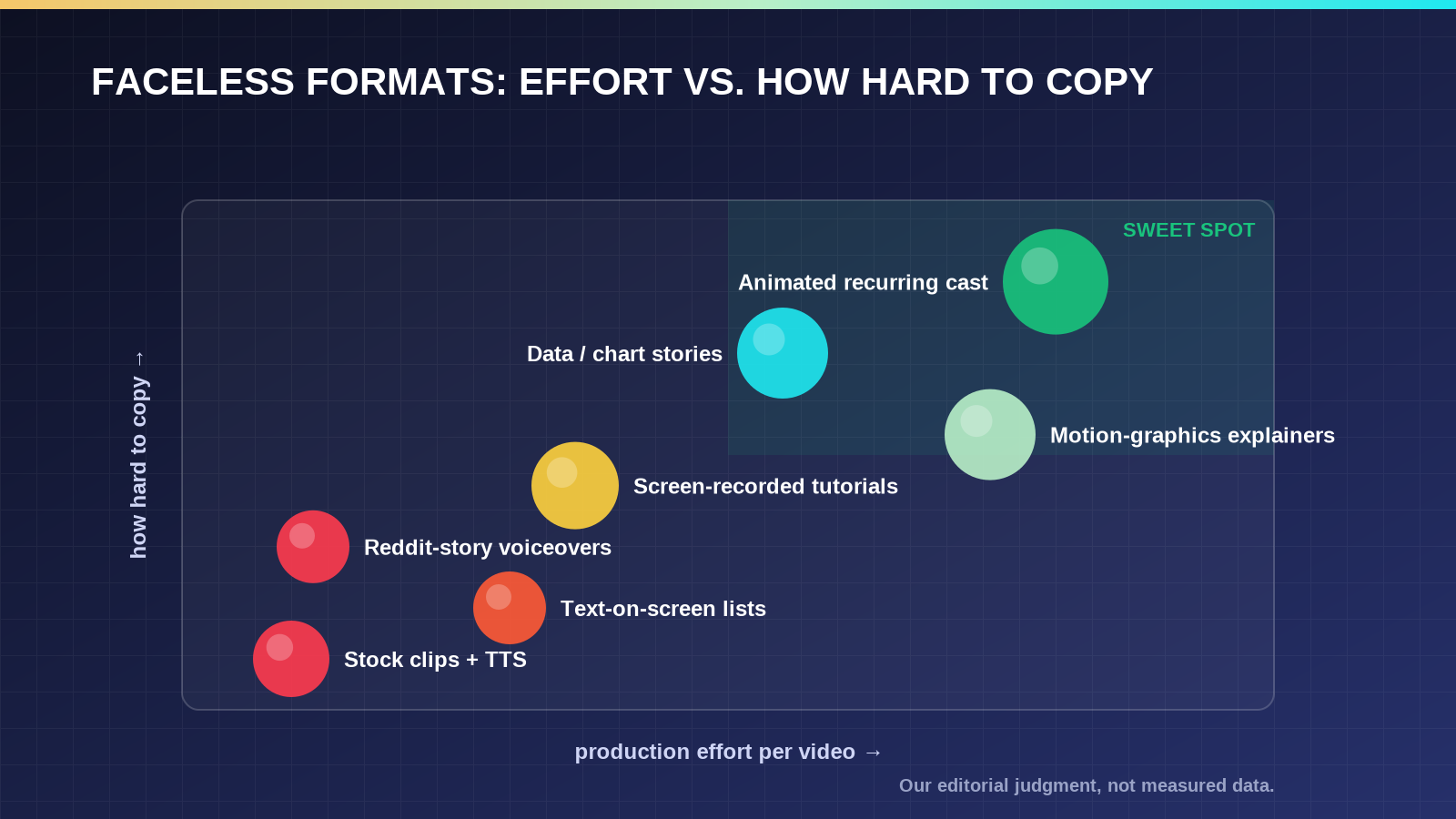
Stock clips with a synthetic voice, or text-on-screen lists, are quick to make, but nothing about them is yours. A recurring animated cast, data stories with your own charts, or motion-graphics explainers take more setup, but each video looks like it came from your channel and nobody else's. That is also what viewers subscribe to. If you are deciding on a niche, our list of faceless channel ideas that work with animated characters goes deeper on formats built around a cast.
Tip: setup effort and per-video effort are different things. An animated format is expensive the first week and cheap after that, because the characters, sets and captions are already built. Text lists stay the same effort forever and never get easier to tell apart from the competition.
The first second and the loop
In the Shorts feed, a viewer decides almost instantly whether to keep watching. The opening of a faceless Short has no face to create curiosity, so the first frame and the first line of voice have to do all the work.
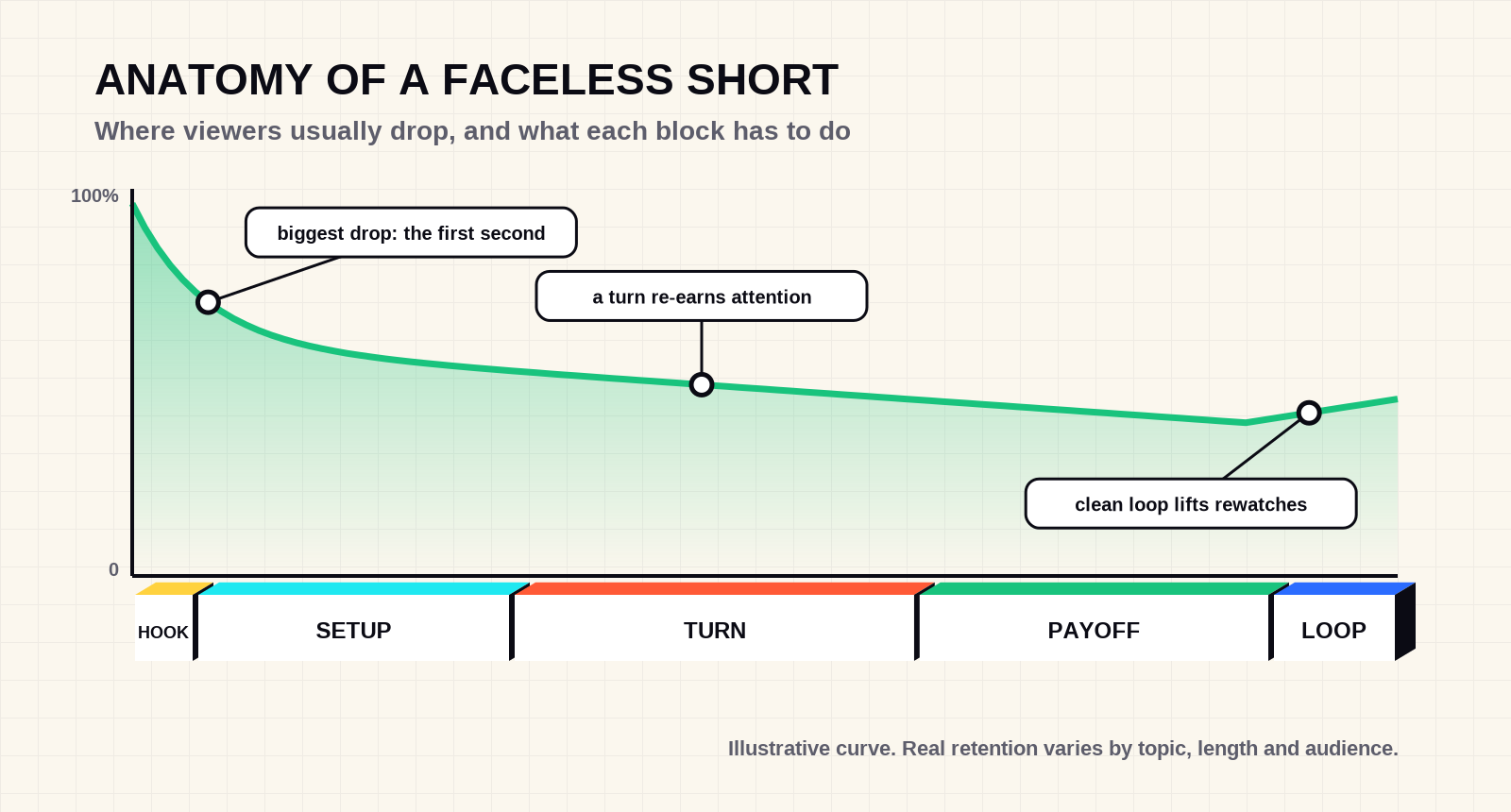
Openings that tend to work for faceless Shorts:
- Start mid-conflict. "He spent $40,000 on this." beats "Today we're talking about spending."
- Show the result first, then explain how it happened.
- Ask a question the visual half-answers, so the viewer stays for the other half.
- Cut the intro. No logo, no "hey guys", no title card.
The end matters too. A Short that ends on a line that flows back into its first line invites a second watch. You don't need a trick ending every time, but avoid the dead stop of "thanks for watching, subscribe" over a black frame.
Captions and the safe zone
Many people scroll Shorts with the sound low or off, so captions are part of the story, not an accessibility afterthought. Keep them to a few words at a time, highlight the key word in color, and time them to the voice. If your voice track is generated from a script, caption timing can be generated from the same audio.
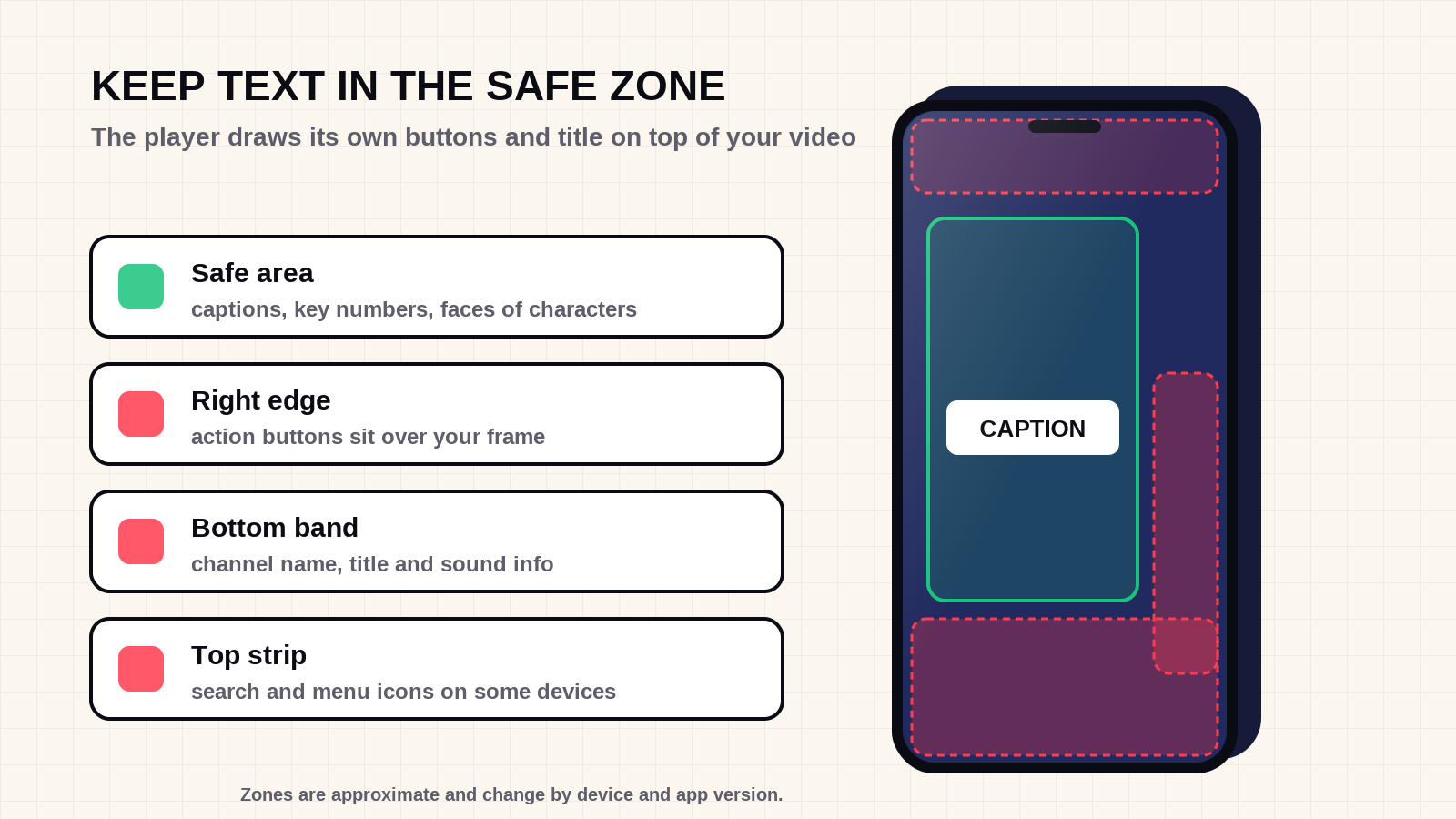
The Shorts player draws its own interface on top of your video: action buttons on the right, the channel name, title and sound information at the bottom, and icons at the top on some devices. Anything important under those areas gets covered. Place captions slightly above the vertical middle, keep a margin on the right, and check a test upload on a real phone before you lock a template.
Build the layers once, reuse them every week
The Starter kit is the setup we use for faceless Shorts: a code-based animation engine, caption and voice wiring, and the prompts. Claude Code installs it and makes a test Short with you.
See the Starter kit, $19One-time payment. Requires Claude Pro ($20/month).
How long should a faceless Short be?
You can now upload Shorts of up to three minutes, but "can" is not "should". There is no single best length; it depends on how much story you have. A few practical rules:
- Fit the length to the idea. A joke with one twist is 15 to 30 seconds. A mini-story with a setup and a payoff often lands between 40 and 70 seconds.
- Cut until it hurts. If a sentence can go without breaking the story, remove it. Faceless Shorts have no presenter charm to cover slow patches.
- Test longer only when shorter works. Once a format holds attention at 45 seconds, try a 90-second version and compare the "average percentage viewed" in Studio.
- Music has limits. If you use a licensed song from YouTube's library in a Short longer than a minute, check the current Help Center rules on how much of the track you can use and how claims are handled; these have changed more than once.
Voice: human, synthetic or none
Voice is the layer people most often get wrong, because it is the one that makes a faceless Short feel either personal or generic.
| Option | Good for | Watch out for |
|---|---|---|
| Your own voice | Commentary, tutorials, anything where personality is the point | Recording time, consistency of sound |
| Free or open-source text-to-speech | Testing a format cheaply, high volume | Flat delivery; viewers recognize common stock voices |
| Premium synthetic voices | Characters with emotion, dialogue, consistent narrators | Monthly cost; check the provider's license for commercial use |
| No voice (text + music) | Visual stories, satisfying processes, quick facts | Captions must carry everything; harder to build a "voice" for the channel |
Whatever you pick, pick one and keep it. A channel that changes narrator every week loses the one thing faceless channels have instead of a face: a recognizable sound. Our guide to AI voices for YouTube compares the options in more detail.
Can faceless Shorts make money?
Yes, faceless channels are monetized on YouTube; there is no rule that you must show your face. What decides eligibility is the YouTube Partner Program. As of November 2026, YouTube's Help Center lists these entry routes for ad revenue sharing: 1,000 subscribers plus either 4,000 valid public watch hours in the last 12 months or 10 million valid public Shorts views in the last 90 days. A lower tier with fewer requirements unlocks fan funding and shopping features. YouTube has also announced higher thresholds for new applicants from February 1, 2027, so check the official page before you plan around a number.
For Shorts, ad revenue is pooled and shared: YouTube says monetizing creators keep 45% of the revenue allocated to them, and Shorts that use licensed music share part of their revenue with music partners. How much a given Short earns varies widely by audience, country and topic, and nobody can predict it for you.
The rule that matters most for faceless creators is the inauthentic content policy (renamed from "repetitious content" in July 2025). YouTube does not monetize content that is mass-produced or repetitive, including videos that look interchangeable because they come from the same template with minor changes. Faceless is fine. Interchangeable is not. The fix is in the format section above: give every Short its own story, and build a look that is clearly yours. For the full picture, read our Shorts monetization guide.
Disclosure labels: YouTube asks creators to disclose realistic altered or synthetic content, such as a real person appearing to say something they didn't. Clearly animated or unrealistic content generally does not need that disclosure, though YouTube may still show a label in the description. Check the current Help Center page if your Short mixes realistic footage with AI.
A realistic weekly routine
Faceless Shorts reward consistency more than bursts. A routine one person can keep:
- Monday: pick five ideas inside your format. Write the hook line for each before anything else; drop the ones whose hook is weak.
- Tuesday: write the scripts in scene language: what's on screen, what's said, one sound per cut.
- Wednesday: generate voices and build the scenes. This is the step worth automating; see what you can automate in Shorts.
- Thursday: render, then watch every Short on a phone. Fix captions, timing and facts.
- Friday: schedule uploads and read last week's numbers in Studio.
If you'd rather have an agent do the building on Wednesday, our walkthrough of Claude AI YouTube automation shows the exact workflow, and the free tools page has a few helpers for the rest of the week.
FAQ
Do faceless YouTube Shorts get monetized?
Yes. YouTube monetizes faceless channels through the YouTube Partner Program, as long as the content meets its monetization policies. What it does not monetize is mass-produced or repetitive content, so each Short needs its own idea and real value.
How long can a YouTube Short be in 2026?
Up to three minutes, in a square or vertical aspect ratio. YouTube raised the limit from 60 seconds for uploads from October 15, 2024. The right length depends on the story; many faceless Shorts work best well under a minute.
Do I need to disclose AI voices or animation?
YouTube asks creators to disclose realistic altered or synthetic content. Clearly animated or unrealistic content generally doesn't need the disclosure, though YouTube may still add a label in the description. Check YouTube's current Help Center page for your case.
What is the best faceless Shorts niche?
There isn't one best niche. Look for topics with steady demand where you can build a format that is hard to copy, such as a recurring animated cast or data stories with your own charts. Avoid formats that look interchangeable with thousands of other channels.
Can I use other people's clips in faceless Shorts?
Reusing content you don't own puts both copyright and monetization at risk. YouTube reviews reused content such as compilations and clips. Faceless Shorts are safest when you create, generate or license every visual.
Your first faceless Short, this week
Start with one format, one voice and one look. The Starter gives you the engine and the step-by-step blueprint so you spend your time on the story, not the setup.
See the Starter kit, $19One-time payment. Requires Claude Pro ($20/month).