
Faceless YouTube · Getting started
How to start a faceless YouTube channel, step by step
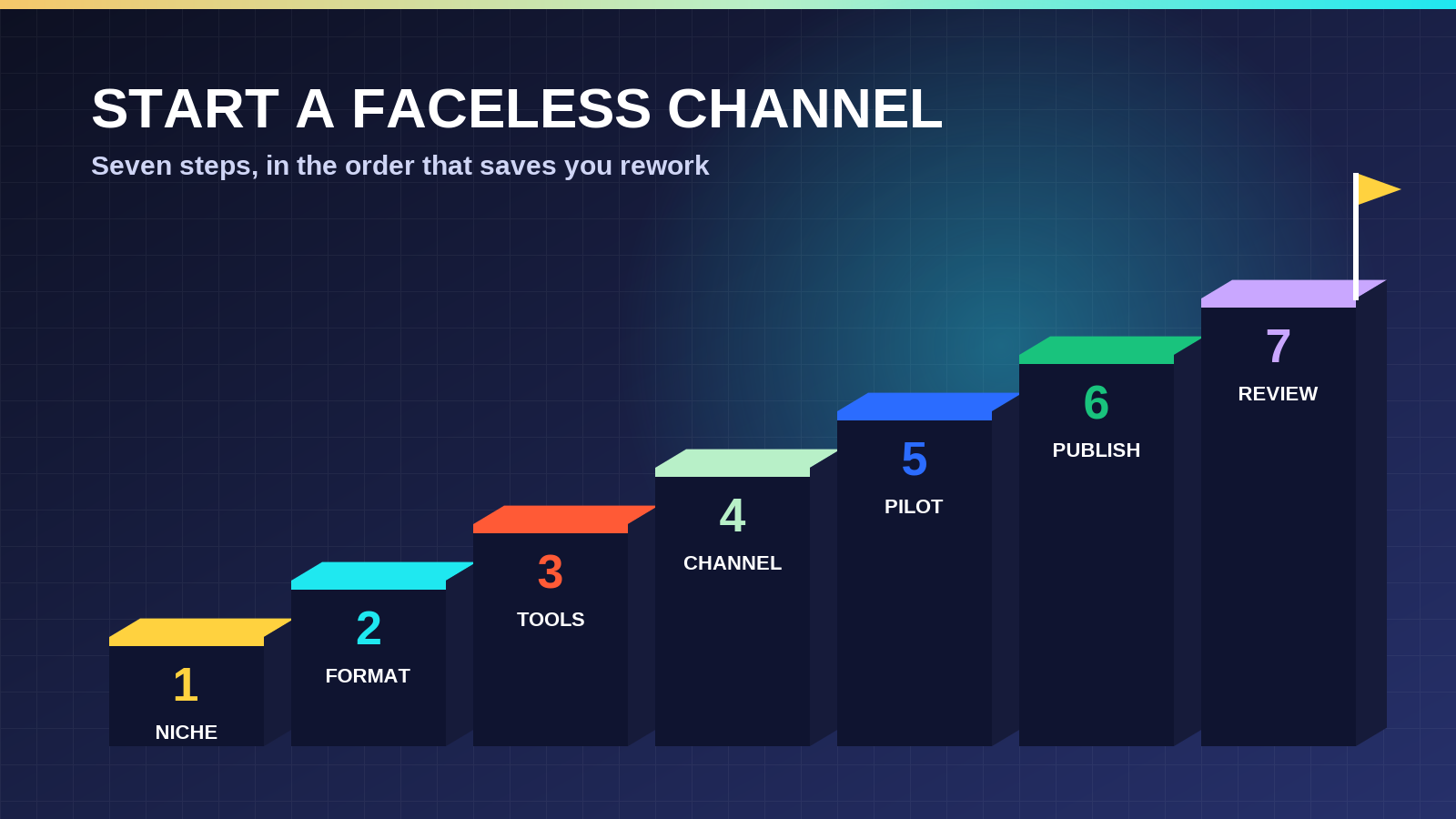
The usual advice for starting a faceless channel is "pick a niche and start posting". That skips the part where most new channels stall: the order of decisions. Pick tools before the format and you'll redo your setup. Design a banner before you've made three videos and you'll redo the banner. This guide walks through the seven steps in the order that saves rework, with the settings people miss on their first uploads and a realistic plan for the first 30 days.
Why the order matters
Every decision in a new channel constrains the next one. The niche decides what formats make sense. The format decides which tools you need. The tools decide how fast you can make pilots. The pilots tell you what the channel actually looks like, and only then is it worth designing the banner, writing the description and planning a schedule. Working in this order means each step builds on something real instead of on a guess.
Step 1: choose a niche you can sustain
The niche question is not "what pays the most?" but "what can I make 100 videos about without hating it?". A faceless channel takes months of consistent posting before you know whether it works, and you will run out of motivation for a topic you picked only for its ad rates.
Test a niche with three quick checks:
- The 30-title test. Write 30 video titles in 20 minutes. If you can't, the niche is too narrow or you don't know it well enough.
- The search check. Type the topic into YouTube search and read the autocomplete suggestions. Those are real questions people ask. A keyword tool can add volume and trend data.
- The crowd check. Look at the top results. If they all look alike, ask what you would do differently. If the answer is "nothing", keep looking.
If you want inspiration, our list of faceless channel ideas built around animated characters scores a dozen niches this way.
Step 2: define the format in one paragraph
A format is the repeatable shape of your videos. Write it as one paragraph you could hand to a stranger:
Vertical Shorts, 40-60 s. Two animated roommates, a spender and a saver, argue about one real purchase per episode. Open mid-argument, one fact on screen, the saver wins with a number, the spender gets the last joke. Same voices, same apartment set, captions in yellow.
Decide here whether you start with Shorts, long videos or both. Shorts are faster to make and test, so they're a good way to find a format that works; long videos build deeper watch time. Many faceless channels start with Shorts and later turn the formats that work into longer horizontal episodes.
Step 3: pick a production method
Only now choose tools, because now you know what they have to produce. There are three broad routes:
| Route | Best for | Trade-off |
|---|---|---|
| Manual editing in a video editor | Screen recordings, tutorials, commentary over your own visuals | Every video costs the same hours; hard to scale |
| Templates in an online design tool | Text-led Shorts, simple motion graphics | Fast to start, but your videos can look like everyone else's |
| Code-based engine run by an AI agent | Animated casts, data stories, anything you'll repeat weekly | Setup takes a few sessions; then each video is mostly writing |
Whatever route you pick, run a full test before step 4: one rough video from script to exported MP4. It will surface every missing piece (fonts, voices, export settings) while nothing depends on it yet. If you're new to this, AI video editing for beginners explains the basics, and Claude AI YouTube automation walks through the code-based route.
Step 3, already done
The Starter kit is a production method you can install today: a faceless animation engine, voice and caption wiring, and the blueprint. Claude Code sets it up with you and makes a first test video.
See the Starter kit, $19One-time payment. Requires Claude Pro ($20/month).
Step 4: set up the channel
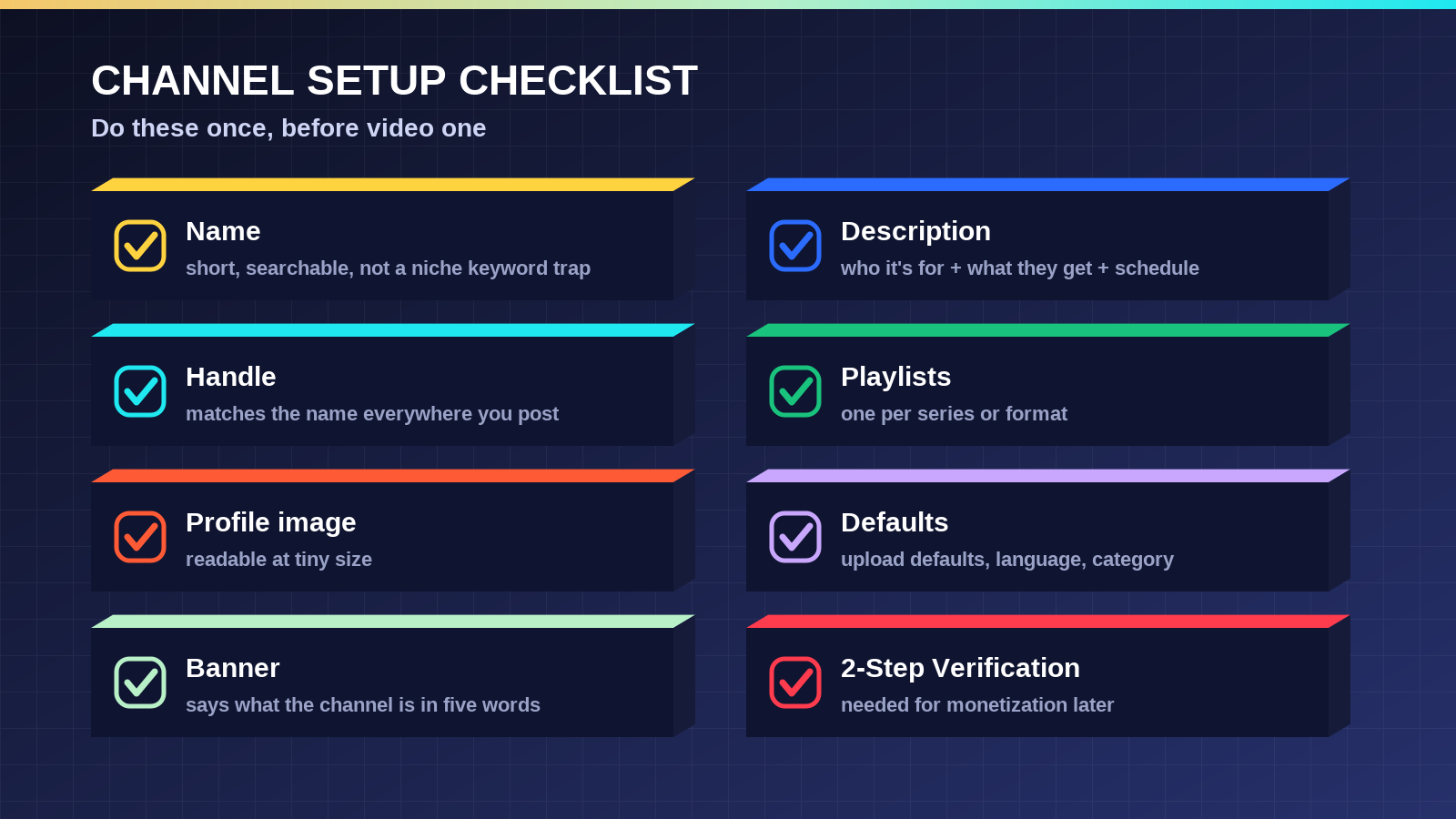
You need a Google Account to create a YouTube channel. Many creators prefer to create the channel under a separate name instead of their personal one, which YouTube supports. Then work through the checklist above:
- Name and handle: short, easy to say, easy to spell. Avoid a name that is just a keyword ("Best Finance Tips"); it limits you and is hard to remember. Keep the handle the same on every platform you use.
- Profile image and banner: they must read at tiny sizes. Use your format's main color and, if you have a cast, the main character.
- Description: who it's for, what they get, how often. Put your main keyword in the first sentence naturally.
- Playlists: one per series or format, so a viewer who likes one video can binge the rest.
- Upload defaults: set your default language, category and description footer in YouTube Studio so every upload starts complete.
- 2-Step Verification: turn it on for the Google Account. YouTube requires it for the Partner Program, and it protects the channel either way.
Step 5: make three pilot videos
Three, not one and not thirty. One video tells you nothing; thirty locks in mistakes you haven't seen yet. Make three in the same format but with different ideas, so you learn what is the format and what was just the topic.
Before each pilot goes out, check it on a phone, with sound:
- Does the first second make you want the second second?
- Can you follow it with the sound off?
- Is any caption or key visual hidden behind the player's buttons?
- Is every fact correct and sourced?
- Is the voice clearly louder than the music?
Step 6: publish with the right settings
A few upload settings matter more than the title for a new channel, because getting them wrong is hard to undo:
- Audience ("made for kids"). Every channel must declare whether its videos are made for kids. Animated content isn't automatically for kids, but YouTube lists animated characters as one factor. Decide deliberately.
- Altered or synthetic content. YouTube asks you to disclose realistic AI-generated or altered content, like a real person appearing to say something they didn't. Clearly animated, unrealistic videos generally don't need it, and using AI for scripts or captions doesn't need to be disclosed. Check the current rules for your case.
- Title and description. Lead with the keyword a viewer would search, in plain words. Write the description yourself, even if AI drafts it.
- Schedule. Pick a cadence you can keep for three months. Two a week you can sustain beats daily for two weeks and then nothing.
If your format is Shorts, our complete faceless Shorts guide covers hooks, captions and length in detail.
Step 7: review, adjust, repeat
After every five to ten videos, stop and read the numbers in YouTube Studio. Change one thing at a time, so you know what made the difference.
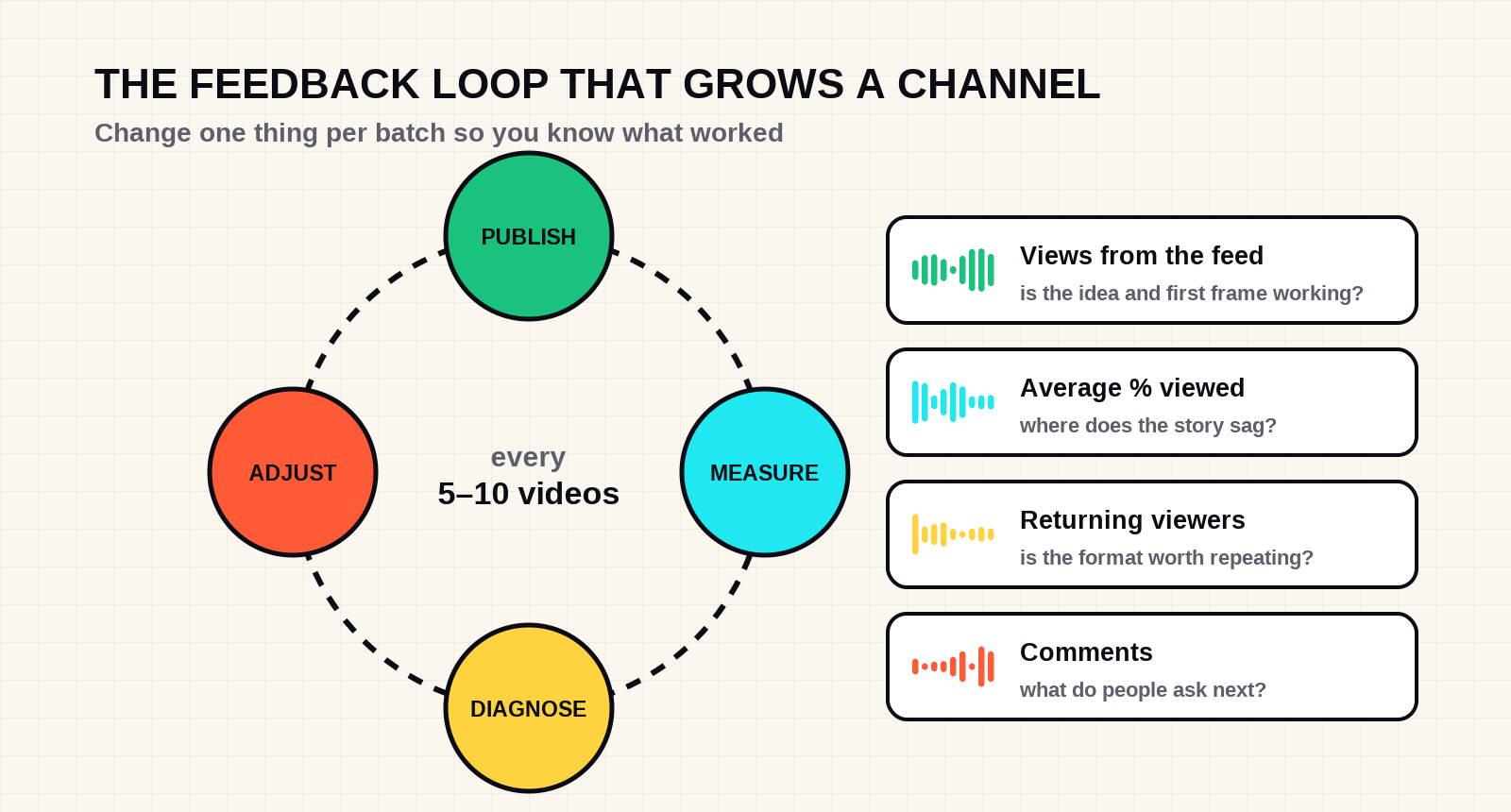
What to look at, in order: whether the feed is showing your videos at all (impressions and views), whether people stay (average percentage viewed and where the drop happens), whether anyone comes back (returning viewers), and what they ask in the comments. A video with few views but strong retention usually has a packaging problem (title, first frame); a video with views but weak retention has a story problem.
About monetization: joining the YouTube Partner Program is a later milestone, not a week-one goal. As of November 2026 the ad-revenue tier asks for 1,000 subscribers plus 4,000 public watch hours in 12 months or 10 million public Shorts views in 90 days, and YouTube has announced higher thresholds for new applicants from February 1, 2027. Requirements change, so check YouTube's Help Center when you get close.
Your first 30 days
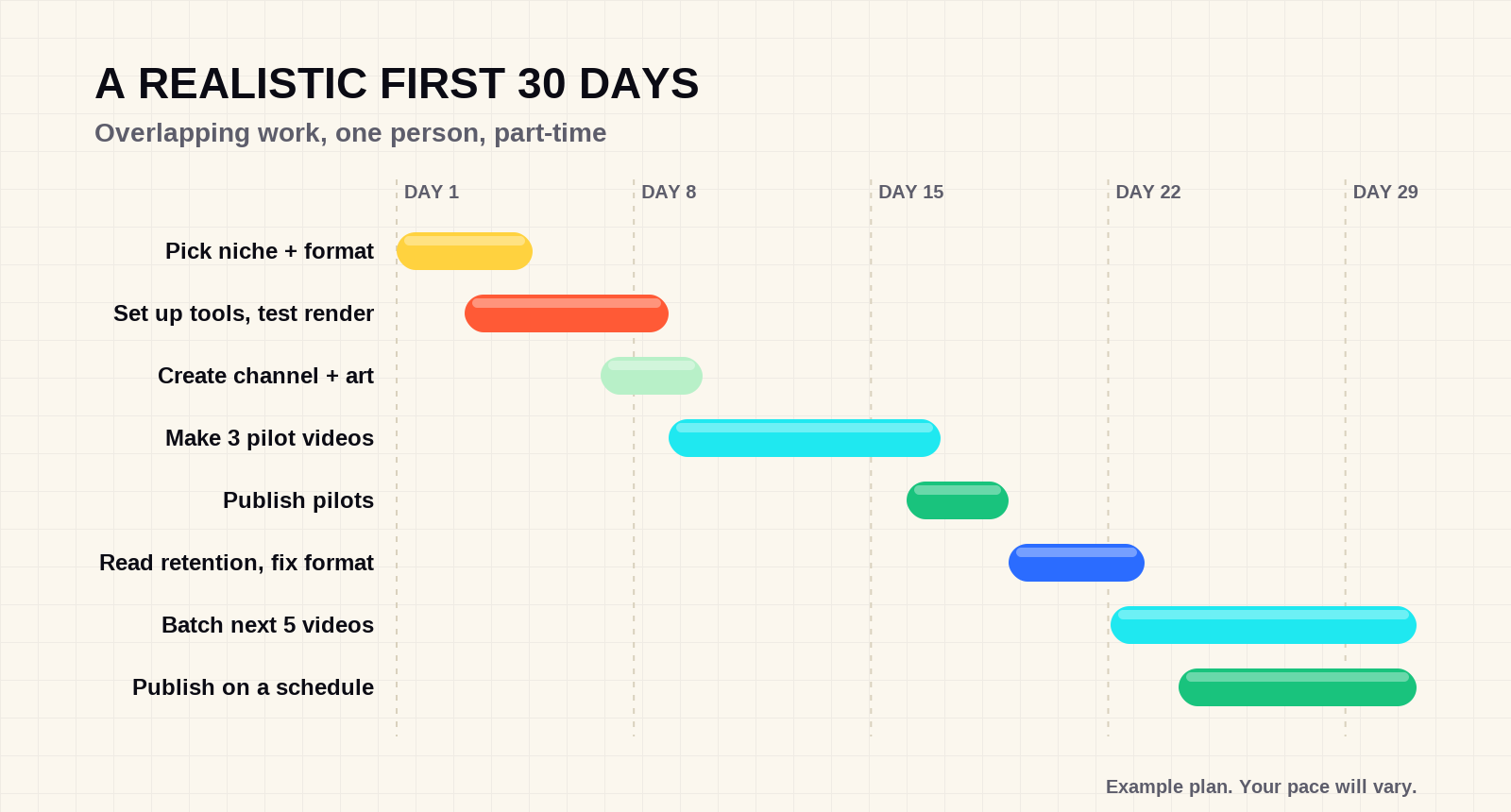
The first week is decisions and setup. The second week is pilots. The third week is publishing them and reading what happened. The fourth week is the first real batch on a schedule. By day 30 you won't have a big channel, and nobody can promise you one, but you will have a format you've tested, a pipeline that works and a routine you can keep. That is what the next 100 videos are built on. Our free tools can help with some of the small jobs along the way.
FAQ
Can you start a faceless YouTube channel with no money?
Yes. You can create a channel for free, use free voice engines and free editing or animation tools, and render locally. Paid tools mainly save time; they're not required to start.
How many videos should I make before judging a faceless channel?
Make three pilots to test the format, then read the numbers after every five to ten videos. Judge the format on a batch of videos, not on one upload.
Do I need to show my face or use my real name?
No. You can run a channel without appearing on camera, and you can create the channel under a name other than your personal one.
Should a new faceless channel start with Shorts or long videos?
Shorts are faster to make and test, which makes them a good way to find a format that works. Long videos build deeper watch time. Many channels start with Shorts and later turn the formats that work into longer episodes.
When can a faceless channel start earning?
It depends on growth, which nobody can predict. YouTube's Partner Program has subscriber and watch-time or Shorts-view thresholds, and YouTube has announced higher thresholds for new applicants from February 1, 2027. Check the Help Center for the current numbers.
From step 1 to your first upload
Get the engine and blueprint we use for our own faceless channels, and spend your first week on pilots instead of setup.
See the Starter kit, $19One-time payment. Requires Claude Pro ($20/month).