
YouTube automation · Beginners
YouTube automation for beginners: what's real and what's a scam
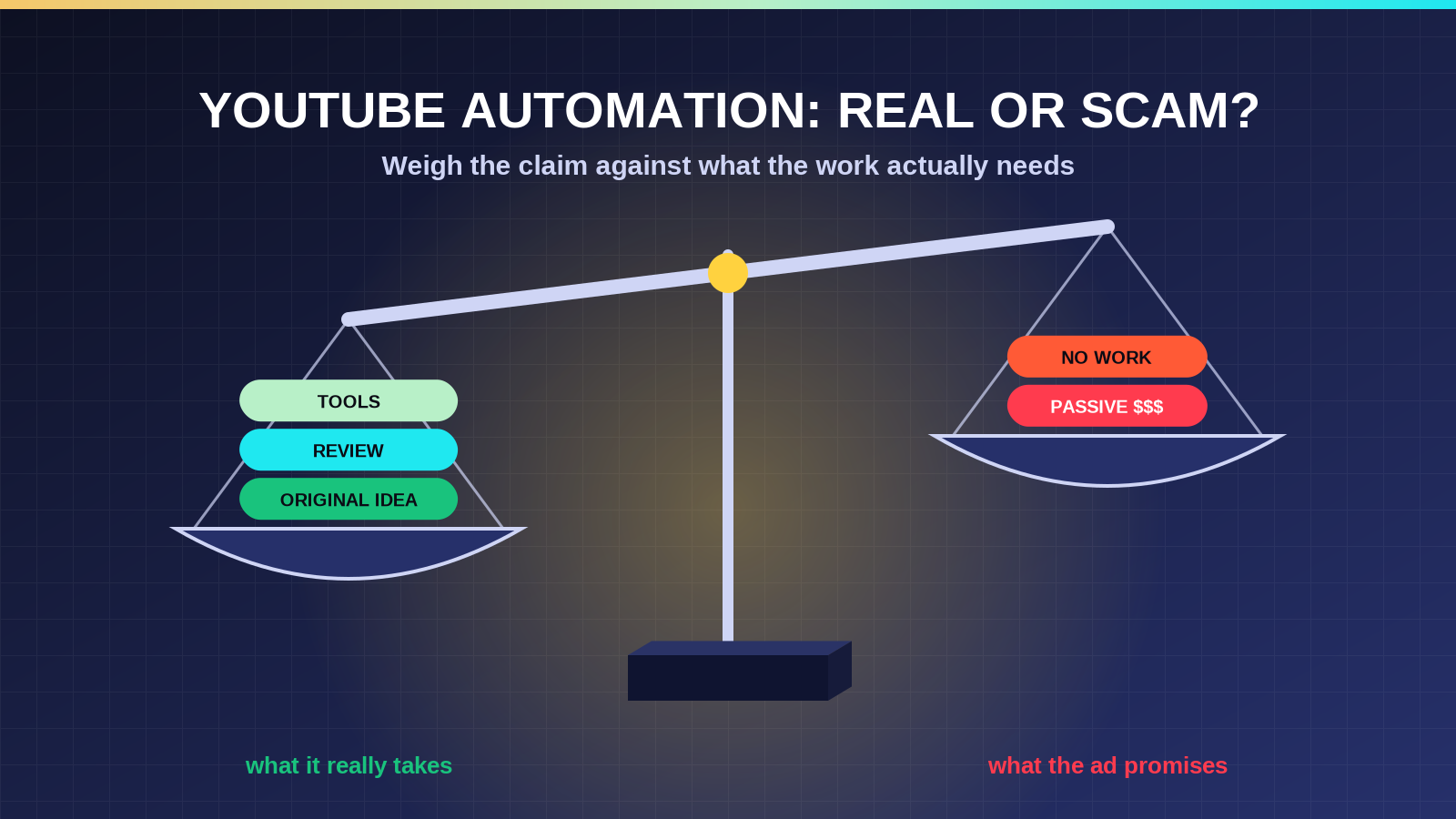
Search for "YouTube automation" and you'll find two kinds of content that rarely meet: people selling the dream of a channel that earns while you sleep, and people warning that it's all a scam. Both are partly right. Some of what's sold under that name is a legitimate way to make videos with less manual work; some of it gets channels demonetized or terminated; and some of it is simply a way to sell you a course. This guide sorts the three, so you can tell which one you're looking at before you spend money.
The three things "YouTube automation" means
The phrase gets used for three very different things. Most confusion, and most scams, come from mixing them up.
| Meaning | What it is | Verdict |
|---|---|---|
| 1. Production tools | Using software and AI to do repetitive parts of making videos: voice, captions, animation, rendering. | Real and legitimate, if a human still owns the ideas and the review. |
| 2. Hiring out | Running a faceless channel like a small business, paying freelance writers, voice actors and editors per video. | Real, but it's a business with costs and risk, not passive income. |
| 3. "Easy money" schemes | Mass-generated videos, reuploads, bought views or "done-for-you" channels sold with income screenshots. | Where the scams and the policy violations live. |
A useful rule: the further a promise moves from "make good videos faster" toward "money without work", the further it is from meaning 1 and the closer to meaning 3.
What's real: automating production
The legitimate version is less exciting than the ads but more durable. A typical faceless video has steps that are the same every time: generate a voice from a finished script, time captions to that voice, place characters and backgrounds, add sound effects at each cut, export an MP4. Those steps can be automated well, and an AI coding agent like Claude Code can now build and run that kind of pipeline for someone who has never written code.
What stays human is the part that decides whether anyone watches: choosing the idea, shaping the story, checking the facts, and watching the finished video before it goes out. That's not a limitation of today's tools; it's the job. If you want the full split, task by task, read what you can automate in YouTube Shorts (and what you shouldn't). For the setup itself, see our Claude AI YouTube automation walkthrough.
The YouTube rules every beginner should read
You don't need to memorize YouTube's policies, but four of them decide what "automation" is allowed to do. All are on YouTube's Help Center, and they change, so read the current versions:
- Inauthentic content (monetization). Renamed from "repetitious content" in July 2025. Content that is mass-produced or repetitive is not eligible for monetization, including AI-generated content made from generic templates where videos feel interchangeable. YouTube's position is that this was always the rule; the update clarified it.
- Reused content (monetization). Videos built mostly from other people's material, such as compilations or clips, need significant original commentary or transformation to be monetized.
- Spam. Using automated tools to churn out high volumes of similar content with minimal changes is described as prohibited. Posting a few variations of a video is fine.
- Fake engagement. Buying or generating views, likes, comments or subscribers, with bots or paid services, is prohibited.
Notice what is not on that list: being faceless, using AI tools, using synthetic voices or animating with code. None of those are against the rules. What's against the rules is the content farm, not the toolbox. One more rule to know: YouTube asks creators to disclose realistic altered or synthetic content (like a real person appearing to say something they didn't), while clearly animated or unrealistic content generally doesn't require it.
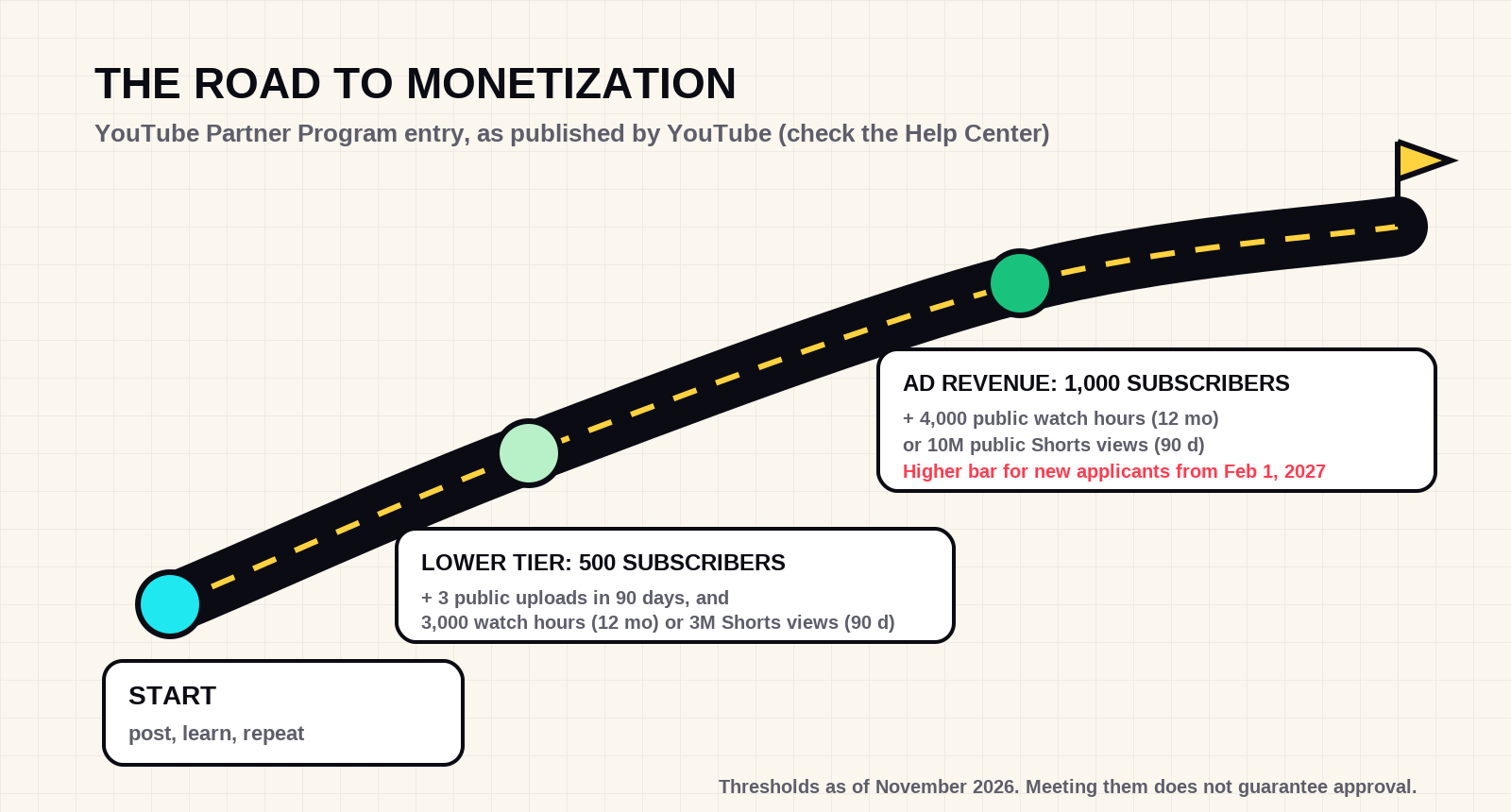
On money: a channel earns from ads only after it's accepted into the YouTube Partner Program. As of November 2026, the ad-revenue tier asks for 1,000 subscribers plus 4,000 public watch hours in the last 12 months or 10 million public Shorts views in the last 90 days, and a lower tier with fewer requirements unlocks fan funding and shopping. YouTube has announced higher bars for new applicants from February 1, 2027. Any course that skips this part, or treats it as a formality, is skipping the hardest part.
What it honestly costs
"Start a YouTube automation channel for free" and "you need a $5,000 budget" are both common claims. The truth depends entirely on which meaning you're doing:
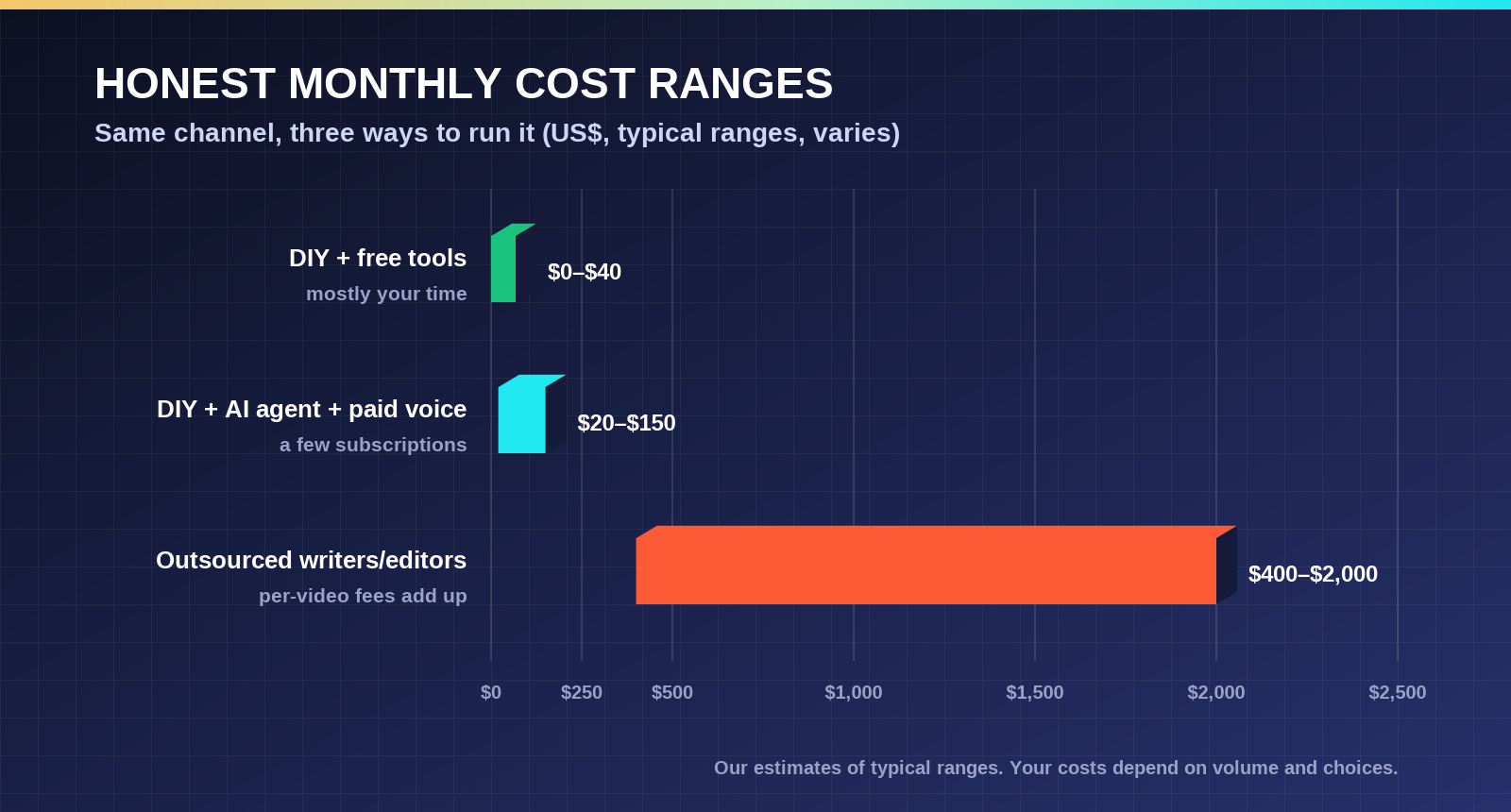
- DIY with free tools: close to zero in money, high in your time. Good for learning.
- DIY with an AI agent: a few subscriptions (for example, Claude Pro is $20/month and includes Claude Code), plus optional premium voices and small cloud render costs. Time per video drops a lot after setup.
- Outsourcing: per-video fees for writers, voice actors and editors add up quickly, and you're paying them before the channel earns anything. This is the version some courses quietly assume without saying so.
Whatever you pick, budget as if the channel earns nothing for months. Many channels never reach monetization, and anyone who tells you otherwise is guessing or selling.
A tool, not a promise
The Starter kit is a production tool: an animation engine and a blueprint that Claude Code sets up on your computer. It doesn't come with an income claim, because nobody can honestly make one.
See the Starter kit, $19One-time payment. Requires Claude Pro ($20/month).
Red flags and green flags
Courses, tools and services in this space range from genuinely useful to outright fraud. You can usually tell which within a few minutes on their sales page.
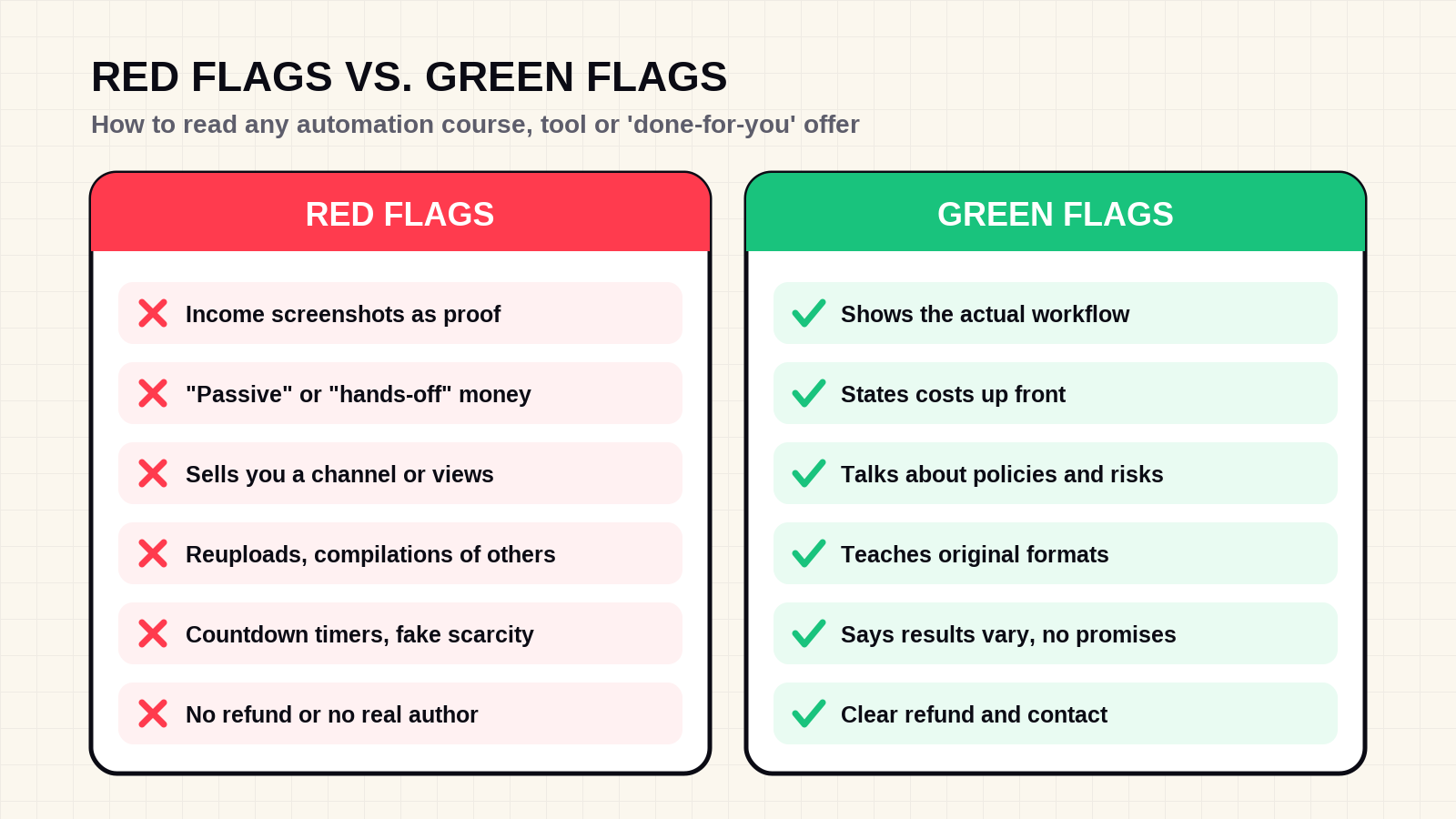
A few deserve more explanation:
- Income screenshots. Even when real, they show one channel's result, usually the best one, without its costs, time or the many channels that failed. They're marketing, not evidence.
- "Done-for-you" or pre-monetized channels for sale. YouTube offers no marketplace for channels, so these deals happen outside any protection, and you inherit whatever history the channel has, including past policy problems. If you're asked to share login details or pay outside a platform, walk away.
- Views or subscriber packages. These are fake engagement. They can get videos removed and channels terminated, and they ruin your analytics even when they don't.
- "Copy viral videos" methods. Reuploading or lightly editing other creators' work invites copyright claims and fails the reused content rules.
Five questions before you buy anything
- What exactly do I get? Files, software, lessons, a community? If the answer is vague, the product is the pitch.
- What does it cost to actually use? Look for subscriptions, voice credits, freelancers or ad budgets you'd need on top of the price.
- Does it mention YouTube's policies? A serious guide talks about inauthentic, reused and fake-engagement rules. One that doesn't either doesn't know or doesn't want you to know.
- Who's behind it, and how do I reach them? A real name or company, a contact page and a written refund policy are the minimum.
- Does it promise results? If yes, that's your answer. Results on YouTube vary with the idea, the execution and luck, and nobody can honestly guarantee them.
A safe way to start
If you're a beginner, start small and keep your money risk close to zero until you've learned what works:
- Pick a format you'd enjoy making 50 times. Our list of faceless channel ideas with animated characters is a starting point.
- Follow the step-by-step guide to starting a faceless channel: format first, tools second, channel setup third.
- Automate the mechanical steps only (voice, captions, render), and keep the ideas, facts and final review yours.
- Publish on a schedule you can keep for three months, and read your numbers every five to ten videos.
- Spend money only to remove a bottleneck you've actually hit, not one a sales page told you about.
That path is slower than the ads promise, and it's the one that leads to a channel you own, that follows the rules and that gets better with every batch. Our free tools can help with some of the small tasks on the way.
FAQ
Is YouTube automation legit?
It depends on what's meant. Using software and AI to speed up video production is legitimate. Mass-producing near-identical videos, reuploading others' content or buying views breaks YouTube's policies. Courses that promise passive income are a separate risk.
Is YouTube automation passive income?
No. Even a well-automated channel needs someone to choose ideas, check facts, review videos and read the analytics. Outsourced channels add management work and costs. Nobody can promise income from a channel.
Does YouTube ban automated channels?
YouTube doesn't ban channels for using tools or AI. It removes monetization from mass-produced or repetitive content and can terminate channels for spam or fake engagement. The content and behavior matter, not the software.
How much does it cost to start YouTube automation?
It can start near zero with free tools and your own time. Using an AI agent typically adds a few subscriptions, such as Claude Pro at $20 per month. Outsourcing writers and editors costs far more. Costs vary with volume and choices.
Can I buy a monetized YouTube channel?
It's risky. There is no official marketplace for channels, you inherit the channel's history and any past policy problems, and many offers are scams. Building your own channel is slower but much safer.
Start with the real kind of automation
Get the engine and blueprint we use for our own faceless videos. You bring the ideas and the review; the machine does the repetitive middle.
See the Starter kit, $19One-time payment. Requires Claude Pro ($20/month).